Your own coding agents. With no external token costs.
Describe a task in plain language. An agent works in its own copy of your repository, runs tests and submits the results for review. On a BOSGAME, Mac mini, local server, cloud server or external endpoint: you choose the environment, AITJE sets it up.
This applies to local features. If you use external models or online tools, data sharing, costs and dependencies may vary.
Introductory offer for Assistant and Coder for the first 100 paying customers. Availability will be confirmed in your quotation. Hardware and server hire are charged separately.
Local AI · On edge · On premise
Let AI build. You stay in control.
AITJE Coder is an AI Station with an autonomous coding agent that writes code, runs tests and prepares pull requests in your repositories. Local AI models run on edge or on premise on your own hardware or server: your code stays under your control, with no external API token costs for local model processing.
AITJE Coder is a comprehensive environment for coding agents on your chosen hardware or server. The language model performs calculations within that environment or via a deliberately chosen external endpoint. Developers specify tasks in plain language, work with their own tools and approve each result before any changes are made to the repository.
A recognisable project
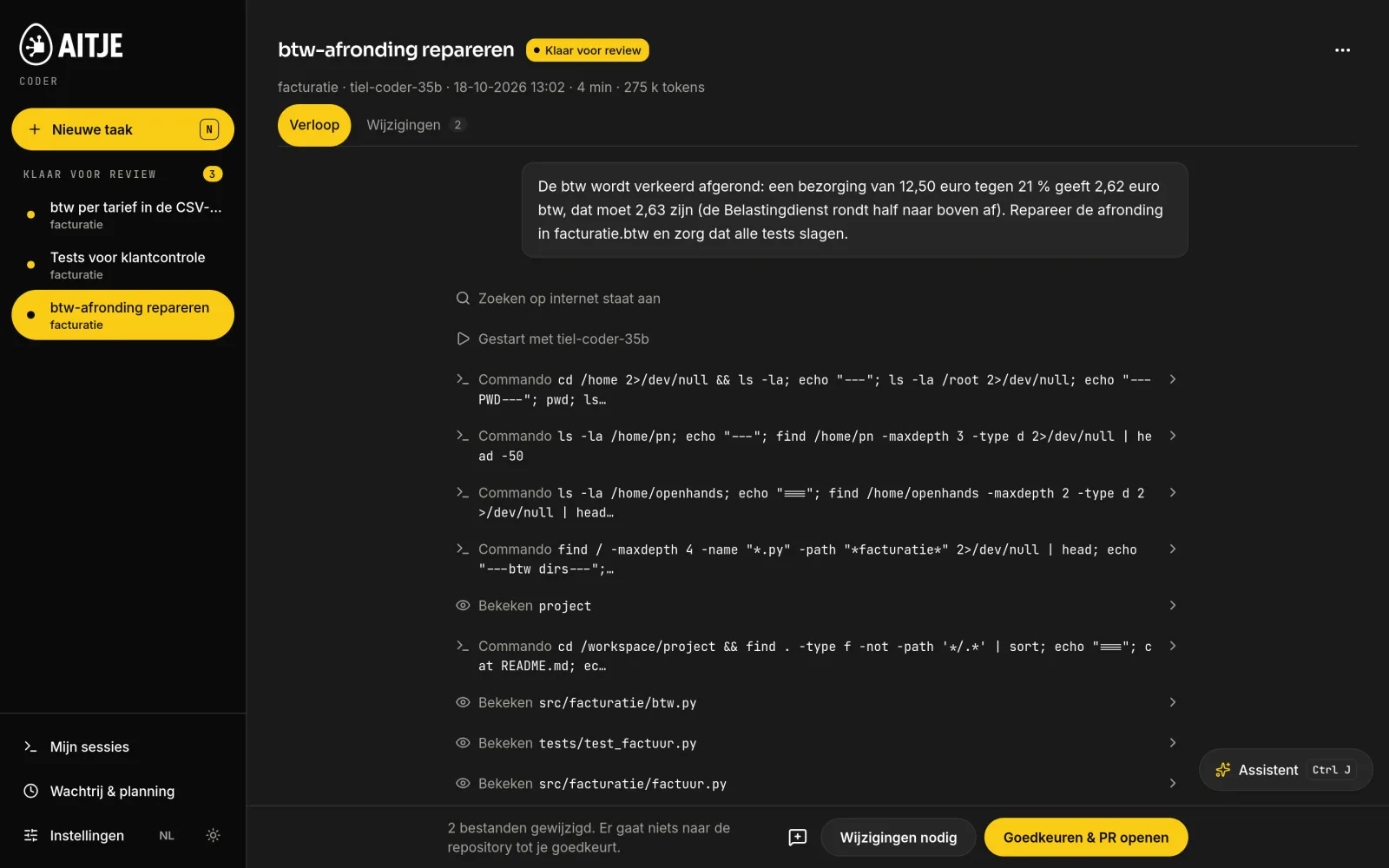
“Correct the VAT rounding and ensure that all tests pass.”
You specify a task in plain language. The agent works independently in its own copy of the repository and submits the result for review. Suitable for tests, bugs, minor features and dependency updates.
Three ways of working on the same device. You can use them side by side.
One web app. Everything for a single task in one place.
AITJE-coder.local/
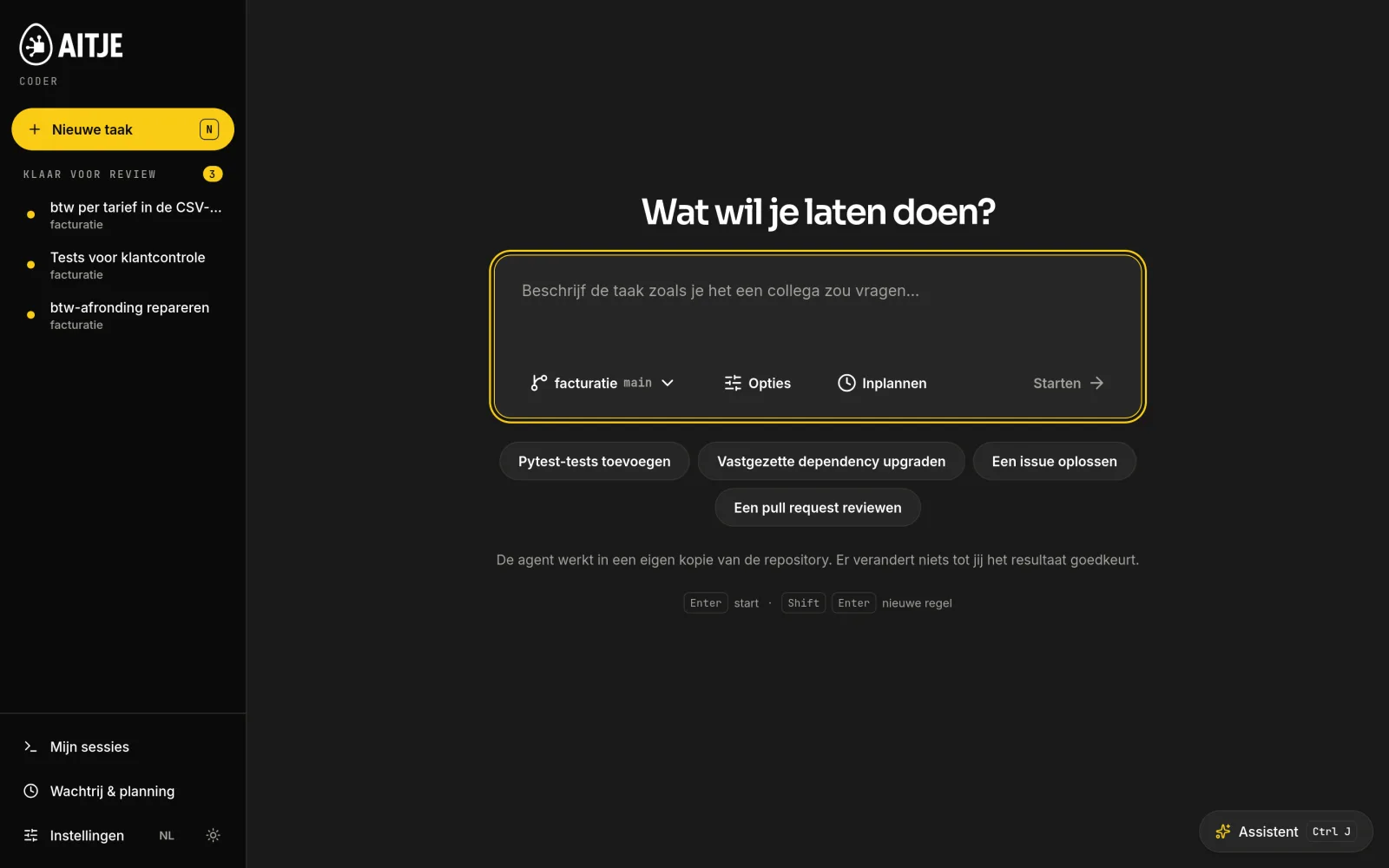
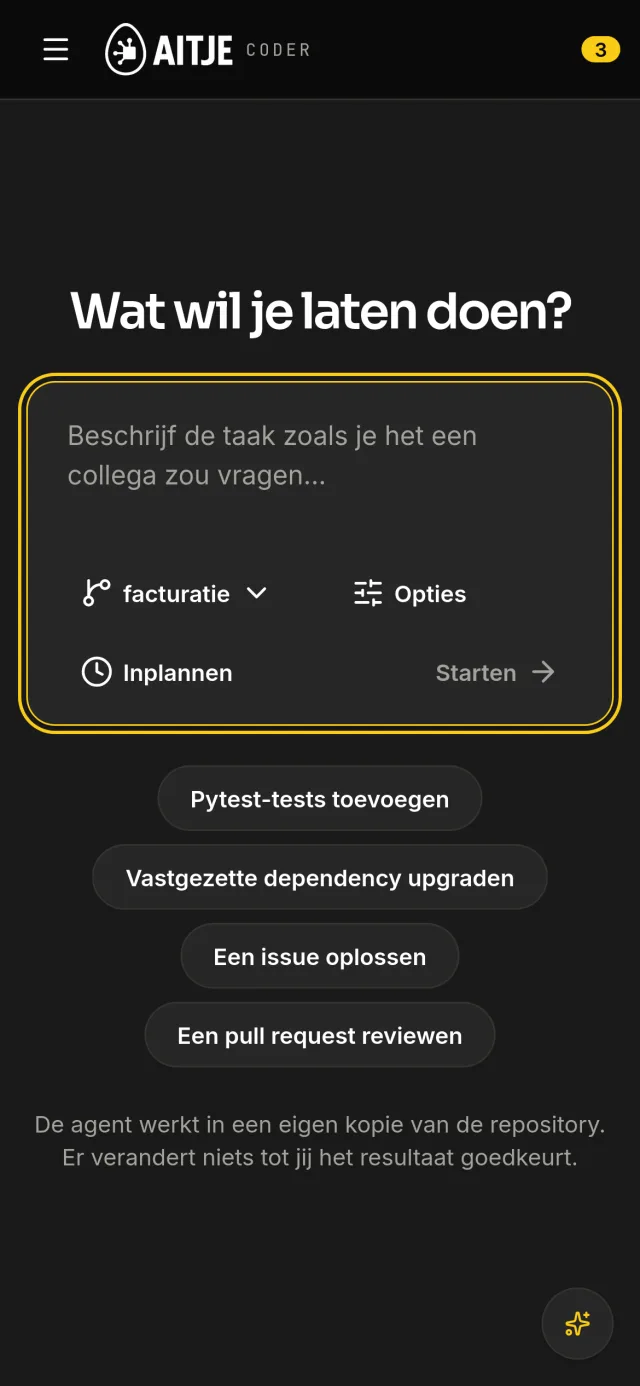
What would you like us to do for you?
One input field, the repository and start branch next to it, and sample tasks below. On the left is what is ready for review.
Real product screenshots, featuring a fictional demo project. Choose the desktop or mobile view and explore both layouts.
Nothing changes without a review
The agent works in its own copy. A pull request is only sent to the repository once you have approved it.
No token invoice per assignment
Local models run on the box. The agent may iterate until the tests pass, without a counter at a cloud provider.
Also available on your mobile
The web app works on any screen within your network. View a result and approve it from your mobile phone.
Four languages, two themes
The interface is available in Dutch, English, German and French, in dark or light mode. You can issue commands in your own language.
What you ask for. What the code does.
This is what you can do with AITJE Coder have built.
A coding agent writes files, executes code and continues to work on the result. Take a look at a 3D scene, a small web app and a real bug fix. The task and the code are included.
The assignment
“Create a premium 3D product presentation of a kinetic object: three brass rings around a glass core, on a dark plinth. Add realistic lighting, soft shadows, material choices, rotation and an exploded view. Make it responsive and ensure minimal movement.”
Rotate the object, switch between brass, steel and copper, and see how the rings fit together. The source code shown here builds the scene you see.
Geometry, materials and lighting in code
Control via mouse, touch and keyboard
Standalone project, to be developed further
The 3D scene and web app have been developed specifically for this page. They demonstrate types of programming work, not measured output from a specific local model run. The bug fix and product shots are taken from the actual Coder demo using fictitious company data. The model, task and controls determine the result.
From assignment to pull request
Place your order. Stay in control.
A task for AITJE Coder always follows the same five steps. The agent carries out the work in its own copy. You assess the result and decide what goes into the repository.
Product illustration featuring real Coder screenshots · fictional demo project
AITJE-coder.local/
Step-01 from 05
Describe the task as you would when asking a colleague to do it.
Select the repository and start branch, type the command and press Enter. Under Options, select the model, web search, links and the number of rounds. Use Schedule to set the same command for a specific time.
Sample tasks and skills will be automatically populated in the field for you
A task can operate across more than one repository
Every task starts with a clean slate
Actual screenshots from AITJE Coder, taken on 18 October 2026 on an AITJE box running the tiel-coder-35b model. The Bakery Demo and the invoicing project are fictional. The steps show three tasks from the same demo project; steps 3 to 5 belong to the same task.
From a blank field to a working agent
Type a command, press enter and watch the agent read it. Viewed files are highlighted in yellow.
Start a taskReal screens
Real screenshots from a fictional demo project. The agent tasks were actually carried out; the montage does not show any turnaround time.
From report to approval
The status, the test report and the amended rules. Then the button that opens the pull request.
Assessing a resultReal screens
Real screenshots from a fictional demo project. The agent tasks were actually carried out; the montage does not show any turnaround time.
Aligning with your development process
AI code that fits in your Git workflow.
A single code block is just the start. Coder links the task to the repository, the start branch, the modified files and the review. This allows your team to treat the result as a normal code change.
Your repositoryA chosen starting point
Working copyThe agent reads, edits and tests
Your reviewDiff, report and comments
Pull requestFollowing human approval
Your merger processInternal checks and agreements
You are assessing the actual change.
The agent works on the code you specify. In the diff, you can see every line that has been changed. The report details what has been examined, modified and tested. You can provide feedback on each file and request a retry.
The pull request ensures everything remains verifiable.
The approved change will be recorded in your Git history. Colleagues can review it, existing CI can check the branch, and your own merge policy remains the final step. An open pull request does not automatically result in a merge or publication.
An agent is granted defined access.
The administrator determines which repositories a developer is permitted to use and whether they may connect to repositories themselves. The agent works in their own working directory. To access Git, the agreed connection is set up, using tokens or a supported GitHub login.
The result remains the property of your team.
Code, tests and history remain standard project files and Git changes. You can further amend the change, reject it or revert it via your own process. You do not need to copy the work from a chat to turn it into a reviewable change.
A coding agent with a steady workflow
You don’t need to for every task Press ‘Start’.
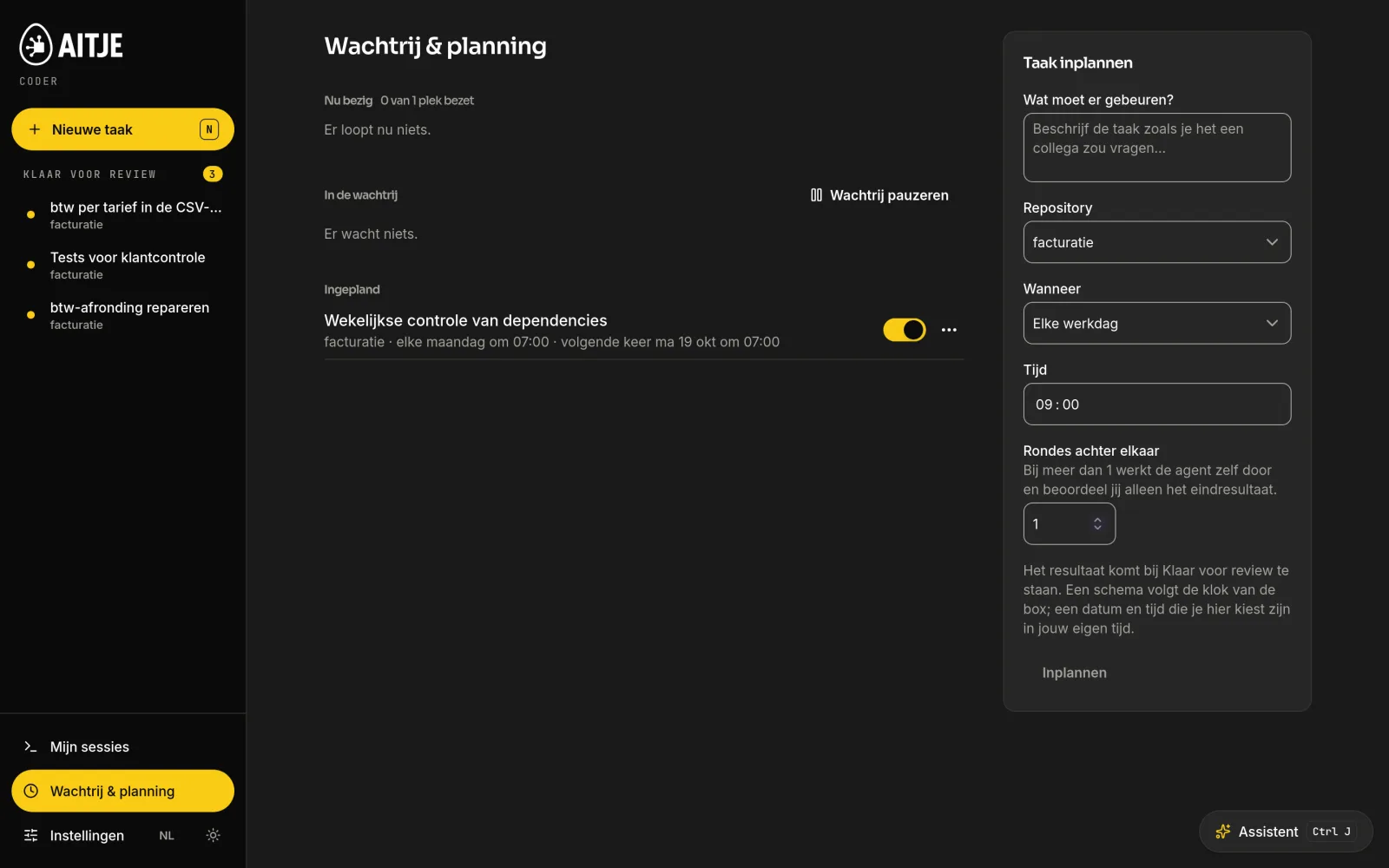
Schedule maintenance, checks or a specific programming task on the server environment. The server will queue the job at the appropriate time; you can close your browser. The result will reappear amongst the tasks you can review.
Monday · 07:00Weekly check of dependenciesThe actual planned example from the product listing.
Every working day · exampleRun the tests and investigate what is failingAn original work, with the owner’s sources and rights.
In the event of an incidentA push or a new issue as a starting pointVia a configured webhook for the supported Git/issue environment.
AITJE-coder.local/queue
Actual product recording using a fictitious demo project. The scheduled task is visible under ‘Scheduled’.
One-offDailyWorking daysWeeklyCustom cron scheduleIn the event of a pushGitHub issueLinear-issue
The server environment and task processing must be available. A schedule utilises the owner’s permissions and limits. External repositories and webhooks must be accessible. With multiple rounds, the agent can continue working on the task; assessment and publication remain part of the agreed review process.
Read. Build. Test. Improve.
The tokens count towards the total. The external invoice does not.
A coding agent uses context, writes code and tries again. With a local model, this takes place on your own computing power – even if a task requires many model runs.
Local model processing€0
external token costs per project and per million tokens
01Reading the codeFiles and context
02BuildingEditing files
03CheckTesting and improvement
All model runs on your own box or server
The agent does, however, use tokens. With local inference, you do not need to purchase tokens from an external AI provider. The available hardware, context and configured usage limits determine how much work can be processed at any one time.
Software, hardware, electricity and maintenance incur separate costs. If you deliberately choose an external model, the rates of that provider and the agreed budgets will apply.
Queue tasks or schedule them in advance. The agent will process them one by one. The result will be ready for review when you return.
Schedule at a time that suits youEvery working day, day or week, once on a specific date, on a push, on an issue from GitHub Issues or Linear, or according to a custom cron schedule.
Consecutive roundsLet the agent run the process 2 to 20 times on its own output. You only assess the final result.
Developers opt forWhoever is working with the model in the editor or chat takes precedence. Pending tasks will start as soon as there is no activity, and no later than 10 minutes after submission.
A notification when it’s readyVia email, Slack, Teams or Mattermost; when ready for review; if it fails, state the reason; and after merging.
Queue & schedulingReal screens
Genuine queue page. The message at the top actually appeared during filming, as people were working in the chat at the same time. Mattermost and email have been tested against real servers; Slack and Teams have not yet been tested.
One environment · desktop and mobile
Your agent is working. You’re in charge.
Submit a task, view the result or review the modified files. You can do this on your phone too, via the same web app. The model and code remain on the chosen server environment; your phone is simply the point of access.
BrowserOwn environment
Within our own network. We set up external access via a VPN or agreed secure access and HTTPS.
Product illustration featuring real Coder screenshots · fictional demo project
Your own tools
Work with the coding agents that your team is already familiar with.
The box speaks the language of the familiar tools. You only need to change the address and the key; your workflow remains the same.
Claude CodeDirectly, via the Anthropic Messages API from the box
OpenCodeRecommended, with ready-to-use configuration
Codex CLIConfiguration via the AITJE-coder config codex
AiderAlso includes sessions in the overview
Cline · Roo Code · Kilo CodeIn VS Code
Continue · ZedAdd content and chat within your editor
A configuration is available for each of these tools. Long sessions in Claude Code, OpenCode, Codex and Aider are automatically summarised before they become unresponsive.
Summarise in three lines
# eenmalig: de CLI van de box
curl -fsSL http://aitje-coder.local/connect/cli | bash
aitje-coder connect aitje-coder.local
# configuratie voor je tool, en een sessie met Git-context
aitje-coder config opencode
aitje-coder session --taak "Bug oplossen" opencode
Prefer to click? The page /connect The box contains the certificate, your personal key and a ready-to-use configuration for each tool.
AITJE-coder.local/sessies
Editing work is also visible
‘My sessions’ shows the work using your own tools, with model requests, tokens, repository and branch. Prompts and responses are not stored there.
What tools send out automatically
Even when using the box as the address, some tools automatically contact their creator: a model catalogue, telemetry or a version check. This is neither a prompt nor code. We have measured this for each tool. /connect For each tool, it specifies the setting that disables it. We could not find a toggle for ‘Continue’.
On your phoneReal screens
Real screens on a mobile phone, within your own network.
Your environment, your code
Your AI, your choice. From on-premises hardware to cloud servers.
AITJE Coder runs on a BOSGAME, a suitable Mac mini, your own local server, a cloud server or an external environment. We can install the application and models together or set up inference via a separate endpoint. You choose whichever option gives you greater independence; AITJE will tailor the hardware, access and management accordingly.
32 GBFor one developer
One agent task at a time. Comes as standard with tiel-coder-35b, which can store up to 128k tokens per conversation. Tested on actual hardware.
128 GBFor a team
More memory for larger models and more concurrent usage. Performance measurements for this version will follow; we will fine-tune the capacity during the trial.
Your laptop or mobile phoneBrowser · terminal · editor
↓ own network or secure connection
Your AITJE Coder environmentLocal model · agent in a secure container · web app · database
With a local model, tasks and code remain on the box. Programming with the installed models also works without an internet connection, provided the box and network are available.
What leaves your environment, and when?
Assignments and code
Stay on the box when using a local model. That is the standard.
Installing packages
The agent may access the internet to install packages. Your network is secure: no NAS devices, printers or servers.
Search the web
Via a search service on the box. Only the search query is sent externally; your command or code is not. Can be disabled per box or per task.
An approved amendment
Submit this as a pull request to your Git server: GitHub, GitLab or Gitea.
External models
Disabled by default. An administrator can add a provider and grant access on a per-user basis. Anyone selecting such a model sends the request and code to that provider.
MCP-koppelingen
Only for tasks where you tick the relevant boxes. The information provided by the agent may contain code.
Notifications
Status and a specific reason for a failed task. Never send code or error messages to a chat channel.
Telemetry and support
Telemetry is disabled by default. Remote support runs via a tunnel that you can enable and disable yourselves.
AITJE Coder AI Station
Your own AI Station. Models, software and data all in one place.
A configured development environment for coding agents. The local model, the agent and the management system run on the agreed computer or server. Developers connect their browser, terminal or editor to that environment.
Your workplaceBrowser, terminal or editor
Secure connectionHTTPS · access per user
Your AI StationOn-site / on-premises / cloud
AITJE softwareAgents, tasks and review
Local modelComputations on your own hardware
PostgreSQLUsers, tasks and management
Git and workbooksRepository copies and code
Where is the database located?
In the standard appliance installation, PostgreSQL runs as a local service within the Coder environment, with its own permanent data volume. This contains users, tasks, schedules, review data and usage statistics. Repositories and the agent’s working folders are stored separately on local storage.
What is on the user’s device?
The browser runs the web app. A terminal or editor can use the model on the box with a personal key; that client’s files may be stored on the developer’s workstation. When performing tasks via the Coder web app, the agent works in their own working directory on the box.
What does the administrator control?
Who is authorised to submit or approve tasks, which repositories a developer is permitted to use, which models and tools are accessible, and what limits apply. Budgets, private keys, support access and the log are managed centrally.
What are the benefits of the AI Station?
Computing power and agent tasks managed in-house, using the team’s repositories and review procedures. AITJE selects and tests models and configures the tools, permissions and queue. Your team can build without needing an external token account for local inference.
If an external AI service experiences a fault
The local model is available without an external model API. Working with locally hosted code can continue as long as the box, local services and network are functioning. However, a new clone, package download or pull request to an external Git service may have to wait for that service to become available. Local inference and external Git accessibility are separate dependencies.
Technical storage in the standard installation
Database
Local PostgreSQL service with a permanent postgres-data-volume.
Git and agent work
Standard under /var/aitje/repos en /var/aitje/work.
Model weights
Local model cache in a separate, permanent volume. No model download required per job.
AI Station describes the configured combination of environment, model and software. The software price, installation and required hardware or hosting are listed separately in the price breakdown and quotation.
Choose your computing power and your model provider
Local AI as a foundation. External inference as an option.
There are two options for where AITJE runs and where the language model performs its calculations. Whether it’s all on your own hardware, a model on your server or a linked inference endpoint: we’ll set up the combination that best suits your work.
01 / Own model environment
On your hardware or server
The model runs on your BOSGAME, Mac mini, local server or your own cloud capacity. Processing remains within that chosen environment; with on-premises inference, there is no external API token account.
Use frontier open models such as the available Kimi, DeepSeek, Qwen and GPT-OSS models via managed inference. AITJE assists with the model, endpoint integration, access and usage budgets.
External processing and pay-as-you-go rates. Public endpoints do not have a fixed country guarantee; we will agree on any required location on a case-by-case basis.
An external model or compatible endpoint may form part of your setup. We tailor provider support, model quality, access and API charges in advance to suit the agent and your workflow.
Give your team some breathing space. Stay in control.
AITJE Coder is more than just a model on a server. The management environment determines who is permitted to work on which code, using which methods and tools, and within what limits.
You decide which code the agent is allowed to work in.
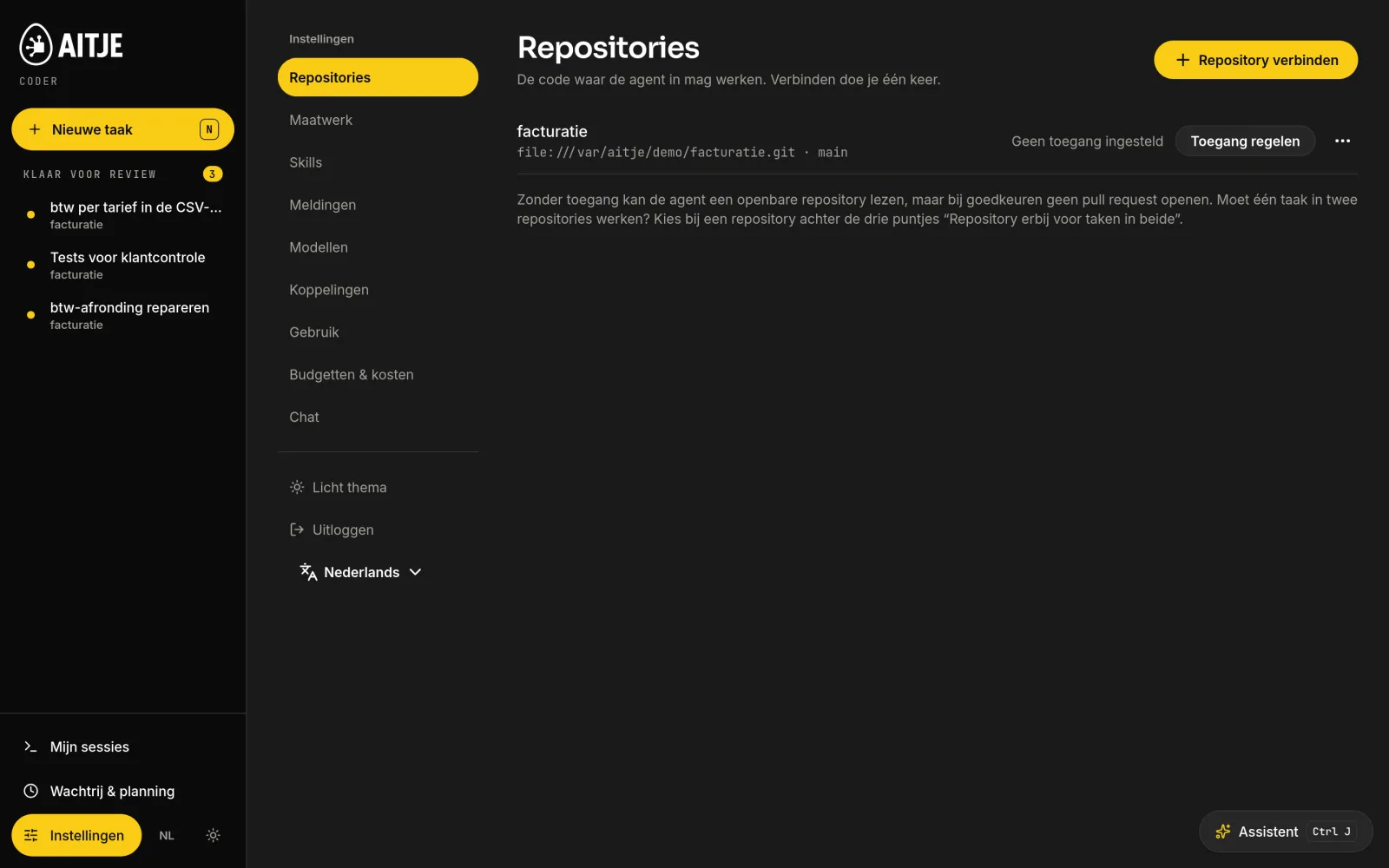
Connect a repository once and manage access on a per-repository basis: log in to GitHub using a code, a token, or revoke access. Without access, the agent can read a public repository but cannot open a pull request.
GitHub, GitLab and Gitea, as well as a self-hosted Git server with its own certificate
Linking two repositories for tasks that work in both
Access tokens are encrypted in the database
AITJE-coder.local/instellingen/repositories
One account per person. Three roles.
Every developer is given their own account and a personal key with their own limits. Invitations are sent via a link or QR code that is valid for 24 hours. Every administrative action is recorded in plain language in the log.
DeveloperSubmit tasks, follow the agent and view changes. Works with a unique key in the editor.
ReviewerYou can also approve or reject results. Approving opens the pull request.
AdministratorIn addition, users, roles, settings, support access and the log. The owner of the box manages accounts and keys.
In a single edit
Five settings, in quick succession.
Repositories, skills, links, budgets and sessions. The yellow border always indicates the rule that determines what the agent is permitted to do.
AITJE Coder settingsReal screens
Actual settings pages from the demo account (reviewer role). An administrator will also see Users, Log, Support and System.
From the first task to day-to-day management
A coding agent. A complete ecosystem surrounding it.
The agent is just the start. Repositories, models, permissions, scheduling, skills, integrations and management make it useful for your team. See what Coder has to offer.
In the actual app
New task · My sessions · Queue & schedule · Settings
01 / 05
From new task to assessed result
01
Tasks and multiple repositories
Select the repository, start branch, model and web search. Where necessary, work on linked repositories within your own secure working folder.
02
Live progress and stopping
Track files, commands, tests and errors. Stop a task with confirmation; a stalled loop will be given a limited number of restarts.
03
Review by file
View changes side by side or one below the other. Provide an assessment and a comment for each file. Compare runs or have a change re-run.
04
Approval and Git
A reviewer opens the pull request on GitHub, GitLab or Gitea. GitHub login using a code and a fork where write access is lacking are supported.
05
Queue management, scheduling and rounds
Queue or pause the process. Schedule it once, daily, weekly or via cron. Start on a push or a GitHub/Linear issue and run multiple rounds.
06
Priority for interactive work
If you are working in an editor or chat yourself, this takes precedence over batch tasks. The queue shows what is pending, running or awaiting review.
AITJE-coder.local/runs
Actual log: report and modified files from the local bug fix.
Based on current product features. We will coordinate the availability of models, external services, hardware capacity and additional setup. The screenshots shown contain fictitious company data; the agent tasks in those screenshots were actually carried out.
How well do local models programme already?
Code that passes tests. That’s where the assessment begins.
The local agent has already fixed bugs, added features and written tests. You can see this in the actual product footage. When selecting a model, we also look at our own tests and published benchmarks, taking into account the task and hardware involved.
AITJE trial · 17 September 2026
A fully agent-run on the BOSGAME M6.
Three Python tasks, each run twice per model, using the actual Coder stack. Hidden tests checked discount codes, a rounding bug and a CLI tool. This allows you to assess a completed task rather than just the speed of individual tokens.
BOSGAME M6 · 32 GB. Small trial on a single repository: six runs per model; no overall success rate for all programming tasks. Turnaround times include the model change and are indicative.
tiel-coder-35b6 / 6 runs successful
Median time from submission to final status: 553 seconds
ornith-35b (1.0)5 / 6 runs successful
Median time from submission to final status: 384 seconds
ornith-1.5-35b4 / 6 runs successful
Median time from submission to final status: 831 seconds
Published model benchmarks · Qwen3.8-27B and Opus 4.6 Max
Open models are included serious programming work.
These figures from Qwen’s model map highlight various strengths. They measure a different configuration to the AITJE test above. A score does not automatically predict the result for your code or for a specific BOSGAME.
SWE-bench Pro
Software changes
Qwen3.8
61.7
Opus 4.6
53.4
Terminal Bench 2.1
Terminal tasks · Terminus
Qwen3.8
73.0
Opus 4.6
78.2
NL2Repo-Bench
Generating code in repositories
Qwen3.8
42.3
Opus 4.6
47.6
Scale 0–100. Qwen’s own evaluation; measurement set-ups and agent configurations vary. For SWE-bench Pro, the Opus score has been taken from the official report. This is not a BOSGAME measurement and does not guarantee that Qwen 3.8 is the standard on every Coder configuration. Quantisation, context, tools and memory influence real-world performance.
Coder keeps the choice of model separate from the agent, the repository link and the review. A new or smaller model may be worth considering for speed, memory or quality. AITJE tests suitable models with similar tasks before recommending a new configuration. The benefits and the timing of these are not guaranteed in advance; updates and model configuration are agreed separately.
From the initial consultation to the first pull request
AITJE gets the job done. You’ll be working with it.
We select and test the configuration based on your tasks. We assess quality, waiting times and concurrent usage using representative workloads.
Start with the work that’s been left undone.
We look at which repositories are involved, who is working with them and which tasks you wish to outsource. This enables us to select the box and model that best suit your needs.
Don’t need your own hardware? AITJE offers multiple servers in data centres running language models and coding agents. Use a pre-configured environment or perform inference via an endpoint, specifically tailored to your workflow.
Tailor your workflow to up to 100× lower API costs.
Cost-saving target for suitable workflows, compared with the use of frontier APIs from OpenAI, Anthropic and Gemini. We assess the model quality, volume and costs against your specific tasks; the rationale and rates will be included in your proposal.
Language modelsCoding agentsInference API
Hosting, computing power and inference are quoted separately. The achievable savings vary per workflow and do not constitute a general price guarantee.
Investing in your own coding agents
Pay once. No charge per assignment.
You purchase AITJE Coder per environment. For local model use, there is no external token account. However, hardware, energy and maintenance are included in the total costs; we make these clear in advance.
Local AI · in-house
AgentIn-house toolsManagement
One product for your environment.
Ongoing use of the delivered version. The number of concurrent users and tasks falls within the capacity of the chosen environment.
AITJE takes care of itWith basic installation
€799
Product + basic installation · excl. VAT
Hardware or hosting is charged separately · subject to quotation
AITJE Coder software
€699
Installation and setup
from €199
Introductory offer
−€99
Product + basic installation
€799
Standard from €898. Introductory offer for Assistant and Coder for the first 100 paying customers. Availability will be confirmed in your quotation.
Installation on a pre-configured, suitable hardware or server environment, testing the system and providing guidance. We agree on a brief follow-up service. The basic installation is estimated to take two to two and a half hours.
You can choose your hardware and hosting separately
Where would you like to run your AI?
The product price shown above is for software and basic installation. New hardware, server hire and paid inference are charged separately. If you have existing suitable hardware, there may be no need to purchase a new device.
BOSGAME M5 / M6 · Mac mini · own hardware · own server · Hetzner · DigitalOcean · AITJE data centre
Work with us to find a suitable solution
Whether it’s your own hardware, an external server, the cloud or a combination: tell us what you want to become more independent from. AITJE will find a suitable technical and financial setup.
Product + basic installation
€799
Hardware / hosting / inference
+ on quotation
Total solution
Personalised quote
Solution and total investment to be quoted. All amounts are exclusive of VAT; external providers and ongoing use are agreed separately.
Hardware, server hire and energyConnecting additional Git servers and repositoriesCustom extensions and integrationsUpdates, new models and supportCosts of external models, if you allow themTravel, location and network costs
All amounts are exclusive of VAT. These components are quoted separately in advance. A demo helps determine which environment and setup are suitable.
Case studies
Coder in practice.
From searching through internal knowledge to connecting work processes. Discover the application, the need and the approach.
Working with the installed models, programming via GUI, API, CLI and locally available frameworks, and reading, modifying and executing local projects.
With internet
Searching for online documentation, downloading new models, using packages and Git services, and remote support where agreed.
Capacity
Speed, model variant, context capacity and the number of concurrent users depend on the hardware. A larger team may require a server or more than one environment.
Compatibility
Configurations are available for Claude Code, OpenCode, Codex CLI, Aider, Cline, Roo Code, Kilo Code, Continue and Zed. Claude Code communicates directly with the box’s Anthropic Messages API, whilst the other tools use an OpenAI-compatible endpoint. Coder does not guarantee compatibility with every tool.
Frequently Asked Questions
Questions about Coder.
What is ‘AITJE Coder’?
A dedicated environment for coding agents: a local alternative to services such as Claude Code and Codex. Agents read and modify your code, execute commands and complete tasks iteratively.
Does Coder work with my own tools?
Yes. Claude Code, OpenCode, Codex, Aider, Cline, Continue and other tools connect to your own model environment. The /connect page in the AITJE environment provides the certificate, your private key and a ready-to-use configuration for each tool. You assign tasks to the agent via the web app.
How much does AITJE Coder cost?
The standalone product costs €699 per environment, with no per-user licence fee. Including basic installation, testing, training and agreed short-term aftercare, an introductory price of €799 applies; the standard price starts at €898. Introductory offer for Assistent and Coder for the first 100 paying customers. Availability will be confirmed in your quotation. Hardware, server hire and additional setup are quoted separately. All amounts are exclusive of VAT.
Are local models good enough for real-world applications?
For many tasks, certainly – especially if you keep them simple and clear. See how a marketing agency uses AITJE Coder 25 to create new game levels every week, or request a demo to discuss the possibilities for your own work.
Can I add another model myself?
Yes. Adding or removing a local model is done within your model environment; AITJE can do this for you either on a stand-alone basis or via an SLA. An administrator can also add an external provider. By default, these models are not accessible to anyone: you grant access to them on a per-user basis.
Which programming languages and frameworks can AITJE Coder work with?
You can work with all programming languages and frameworks; Coder is not limited to a single fixed stack. You can provide additional documentation, instructions and project agreements via ‘skills’. The quality depends on the chosen model and the available context, so for a specific stack, we will test it against your tasks.
Can AITJE Coder work on an existing codebase?
Yes. Coder can read, interpret and adapt existing projects. So you don’t need to start a new project. By providing project documentation and clear instructions, you give the agent context regarding the structure and conventions within your codebase.
How do I determine which files and commands a coding agent is permitted to use?
For tasks carried out via the web app, the agent operates in a secure container with its own copy of the repository. It is permitted to install packages, but cannot access your internal network. You determine access on a per-repository basis; for GitHub, you log in once using a code, without having to create a token yourself. If you use your own tool, such as Claude Code or OpenCode, that tool determines which files and commands the agent is permitted to use.
Can I review changes from AITJE Coder before they are applied?
Yes. For tasks carried out via the web app, nothing changes until you approve the result. You read the agent’s report and see every line that has been changed. Approving opens a pull request on GitHub, GitLab or Gitea; ‘Changes required’ rejects the request or has the agent start again. When using the tool interactively, your own tool determines when approval is required.
Can ‘AITJE Coder’ also write tests and detect errors?
Yes. Coder can write tests, run existing tests and investigate errors. To do this, the agent can use your code, error messages and test results to suggest a change. You can then assess the tests and changes yourself.
Does AITJE Coder need to run on a server in the office?
No. The environment can run on a BOSGAME M5/M6, a suitable Mac mini, existing hardware, a local server, a cloud server with, for example, Hetzner or DigitalOcean, or an AITJE server. The application, agents and model processing can be set up together or separately. AITJE will find the environment that suits your workflow and desired level of independence.
Can the coding agent schedule tasks and prepare pull requests?
Yes. You can schedule tasks as one-off or recurring, with supported timetables and push or issue events. The server queues the work. The agent works in their own working copy, displays changes and checks, and prepares a pull request after review. The required server, permissions, models and Git services must be available.
What additional costs are there on top of the product price?
The product price quoted, including basic installation, is not a total price inclusive of hardware. New hardware, server hire, additional setup, support and any external inference are quoted separately. If you choose your own model running on your own computing power, there is no external API token charge; for paid providers, their rates apply.
Can Coder use external inference via Nebius or AITJE servers?
An administrator can add a supported external model or OpenAI-compatible endpoint, including a suitable Nebius Token Factory integration. AITJE also offers its own data centre servers for models, coding agents and workflow-oriented inference. We test model quality and tool usage against your tasks and set out access, capacity and costs in advance.
Can I request a physical demo or a demo endpoint?
Yes. Request a visit with hardware or choose a demo endpoint for a remote trial. The contact form will automatically include Coder and your chosen demo option. You can also specify your preference for hardware or hosting there.
Wider possibilities
Need something similar, but slightly different?
AITJE Coder See what AITJE can build. Need different workflows, integrations or hardware? That’s possible with AITJE Custom — bespoke AI.