On your own hardware or server, using your own expertise and data within your own environment. Chat locally without external token costs, even without an internet connection.
This applies to local features. If you use external models or online tools, data sharing, costs and dependencies may vary.
Introductory offer for Assistant and Coder for the first 100 paying customers. Availability will be confirmed in your quotation. Hardware and server hire are charged separately.
Local AI · On edge · On premise
Your knowledge. Your own AI.
AITJE Chat Assistent is your own AI Station for chat, voice and answers grounded in company knowledge with RAG. Local AI models run on edge or on premise on your own hardware or server, keeping your data, access permissions and administration under your control.
AITJE Assistent runs on a BOSGAME, a suitable Mac mini or on-premises server, in your own cloud or with a hosting provider. A VPS, GPU server or external model endpoint may form part of the setup. AITJE tailors the hardware, model processing and management to your specific needs.
01 / On-siteOn edge
A small computer. Your own AI environment.
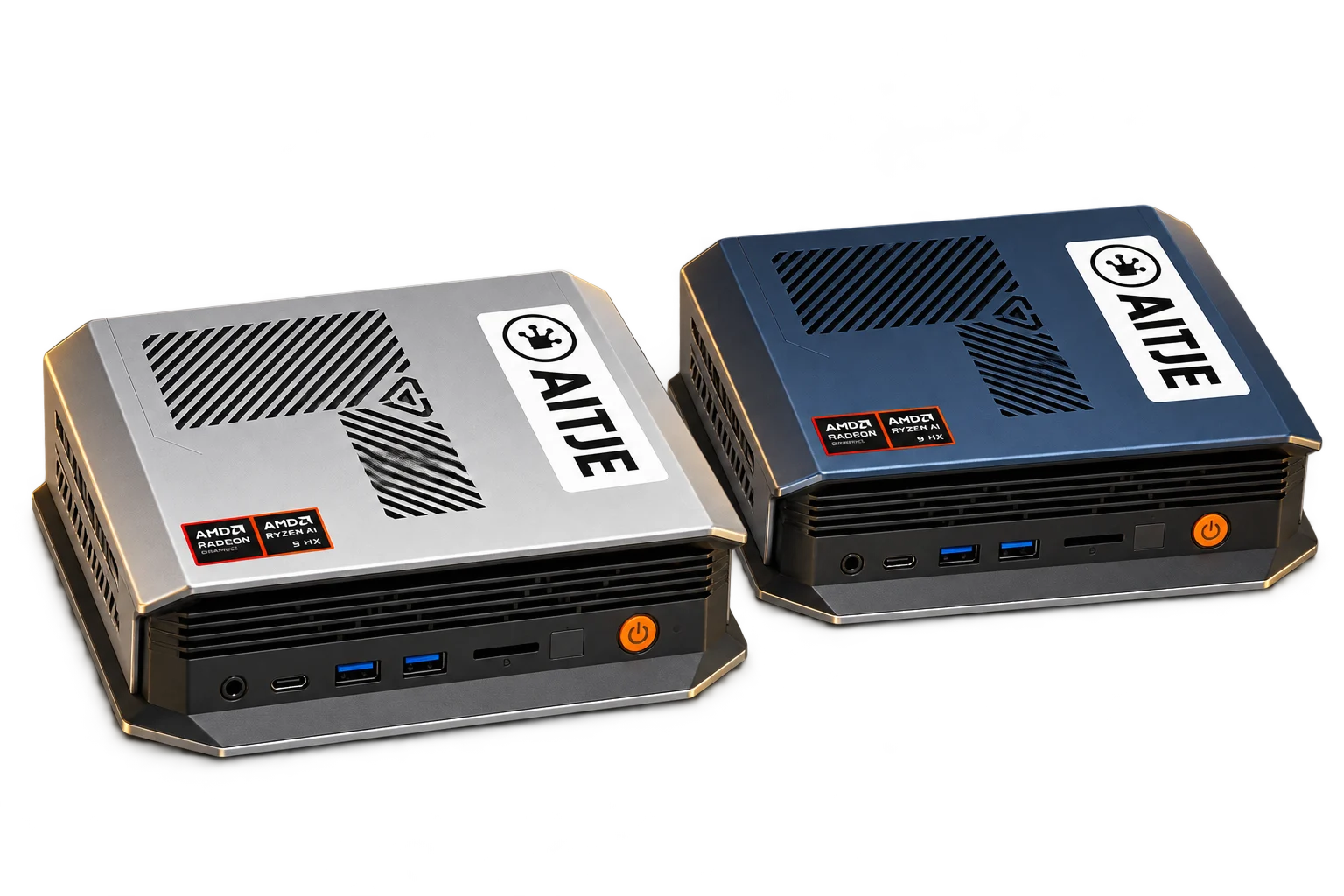
A BOSGAME M5, M6 or suitable Mac mini with adequate memory can run the local model and the Assistant on-site. Your documents, knowledge base and processing remain within the configured environment as long as you use local services.
Local modelIn-house knowledge baseBrowser access
02 / In-house infrastructureOn-premises
Linux · local AI
$ aitje run qwen3.8
Qwen3.8LOCAL
AITJE Assistent↓Your model · your expertise
Example brief ▌
The same Assistant. On the server that suits your needs.
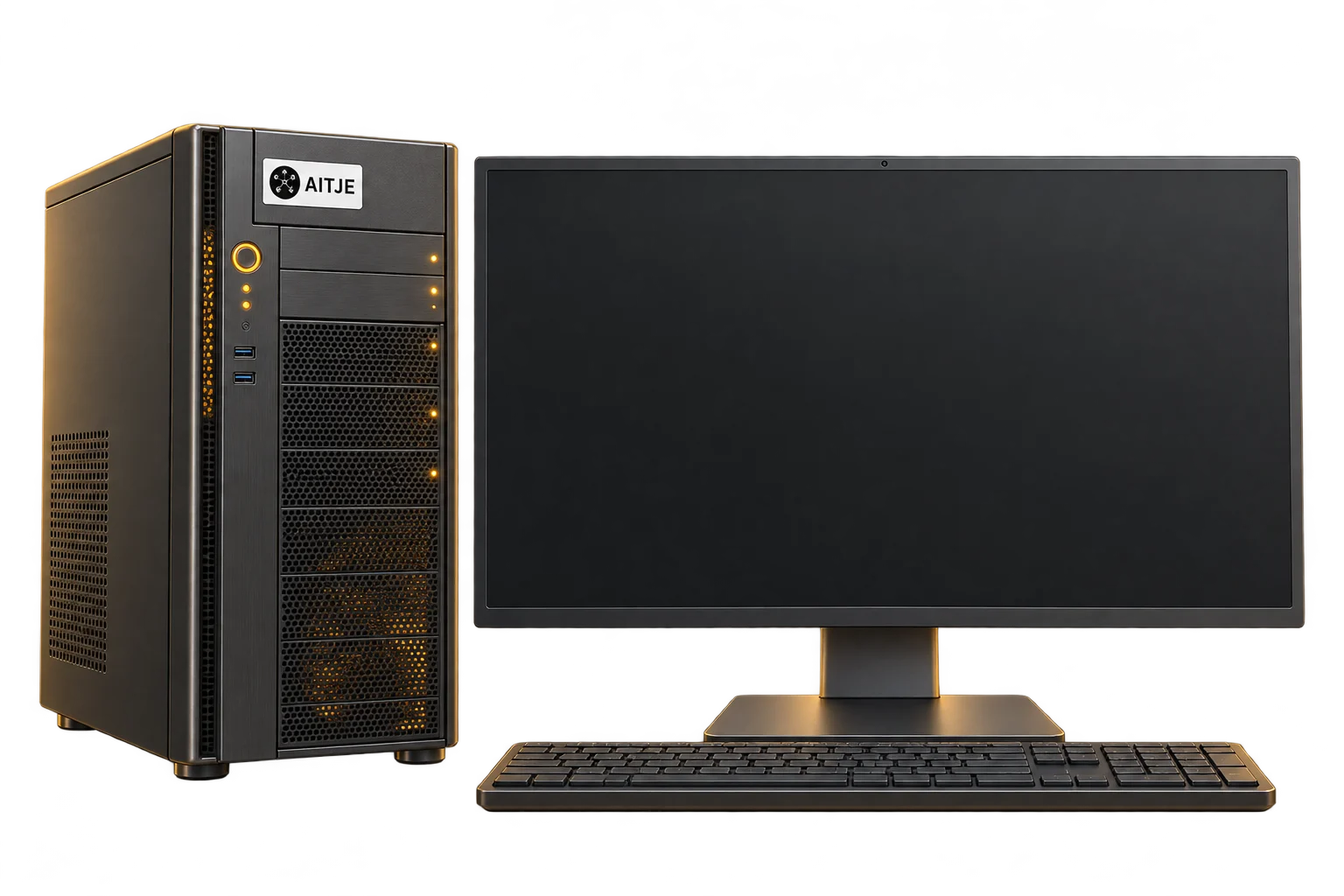
Use your own server capacity, a VPS with Hetzner, DigitalOcean cloud capacity or an AITJE server. The application and model processing can run together or separately; we coordinate capacity and access with your IT department. Users do not need to install a model on their laptop or mobile phone themselves.
Linux serverOwn networkCentralised management
Product illustrations of possible installations. The chosen configuration and capacity are specified in your quotation; hardware is quoted separately.
A complete AI working environment for your team: chat, your own knowledge base and management. The model and processing run locally, on your device or server. Staff open the Assistant in their browser; you determine access, models and rules.
A recognisable business challenge
“What is our procedure for urgent requests?”
Search the authorised work instructions and obtain a response with references to the documents used.
Examples of usage; no live chat.
Three workstations. One environment.
AITJE Assistent /c/Own environment
The workplace for your team
Questions, writing, calculations and interactive results. Using your documents and the models available for your role.
Real product interface with fictitious data. The accessible sections and functions depend on your account permissions.
Writing and asking follow-up questions
Summarise, rewrite and develop ideas. Look up previous conversations and build on your context.
Projects and files
Group conversations, instructions and documents by client or topic. Share them within the defined access rights.
You can also use your voice
Dictate a question and have the answers read aloud, using available voice services and the correct browser permissions.
Multilingual collaboration
An interface in Dutch, English, German and French. The response language and language quality depend on your model.
Your knowledge, put to practical use
From various documents towards useful answers.
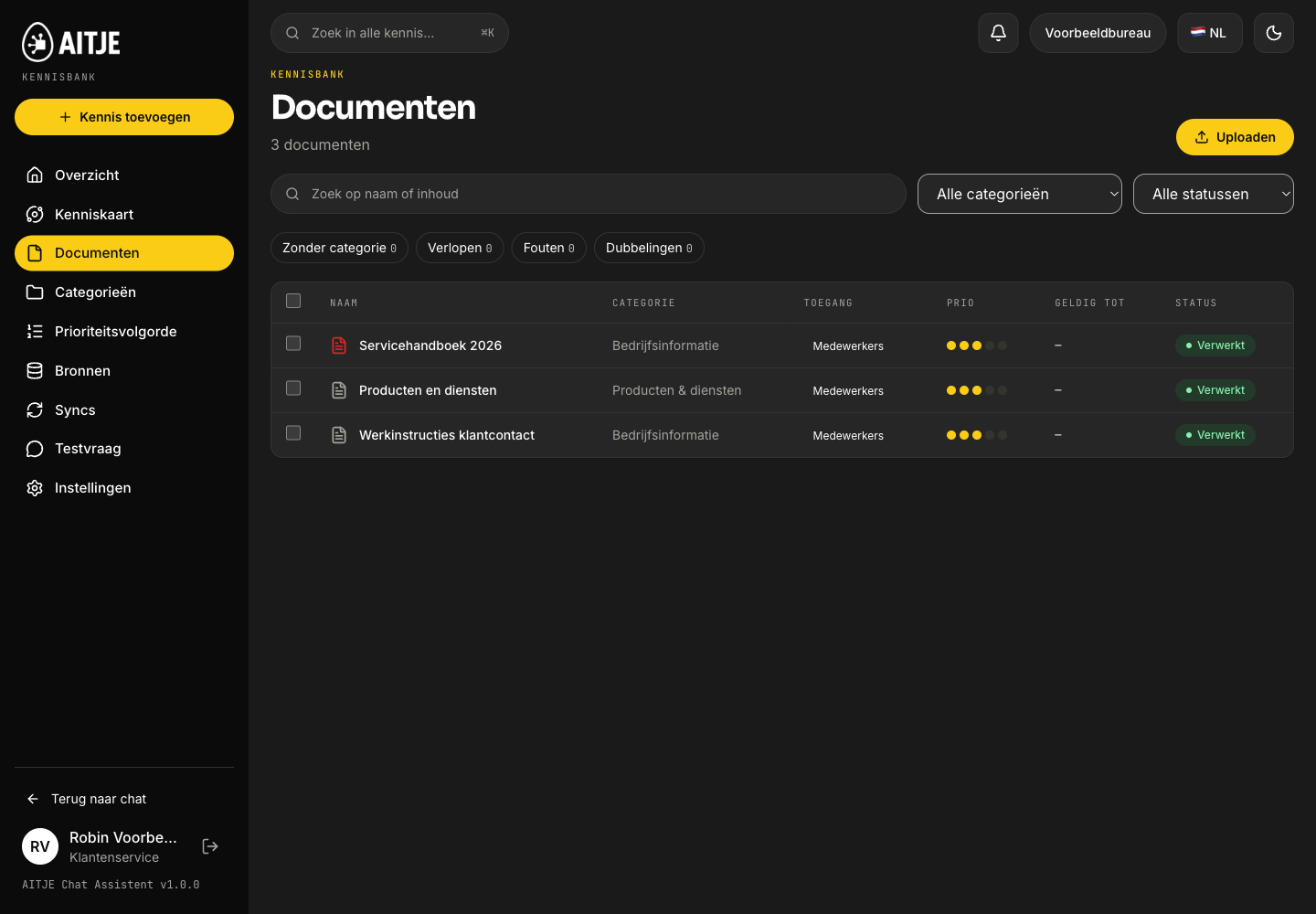
Bring files and linked resources together. Organise knowledge, decide who has access and prioritise important information. Your team can work with it directly from the chat.
Concept illustration featuring a real product photograph · fictitious data
Servicehandboek.pdf
Add a source
Start with a manual, document or agreed source link. For this example, we are using a fictional service manual.
Illustrative learning path with fictitious data; no live model response.
A knowledge base you can rely on
Uploading is just the start. The result is practical knowledge.
Documents are processed into searchable passages. The assistant retrieves relevant, authorised information in response to your query and uses it as context. You do not need to retrain the chat model for this.
Documents, tables and scansProcess text and document structure, using OCR where necessary. Scans that are difficult to read and complex tables require checking.
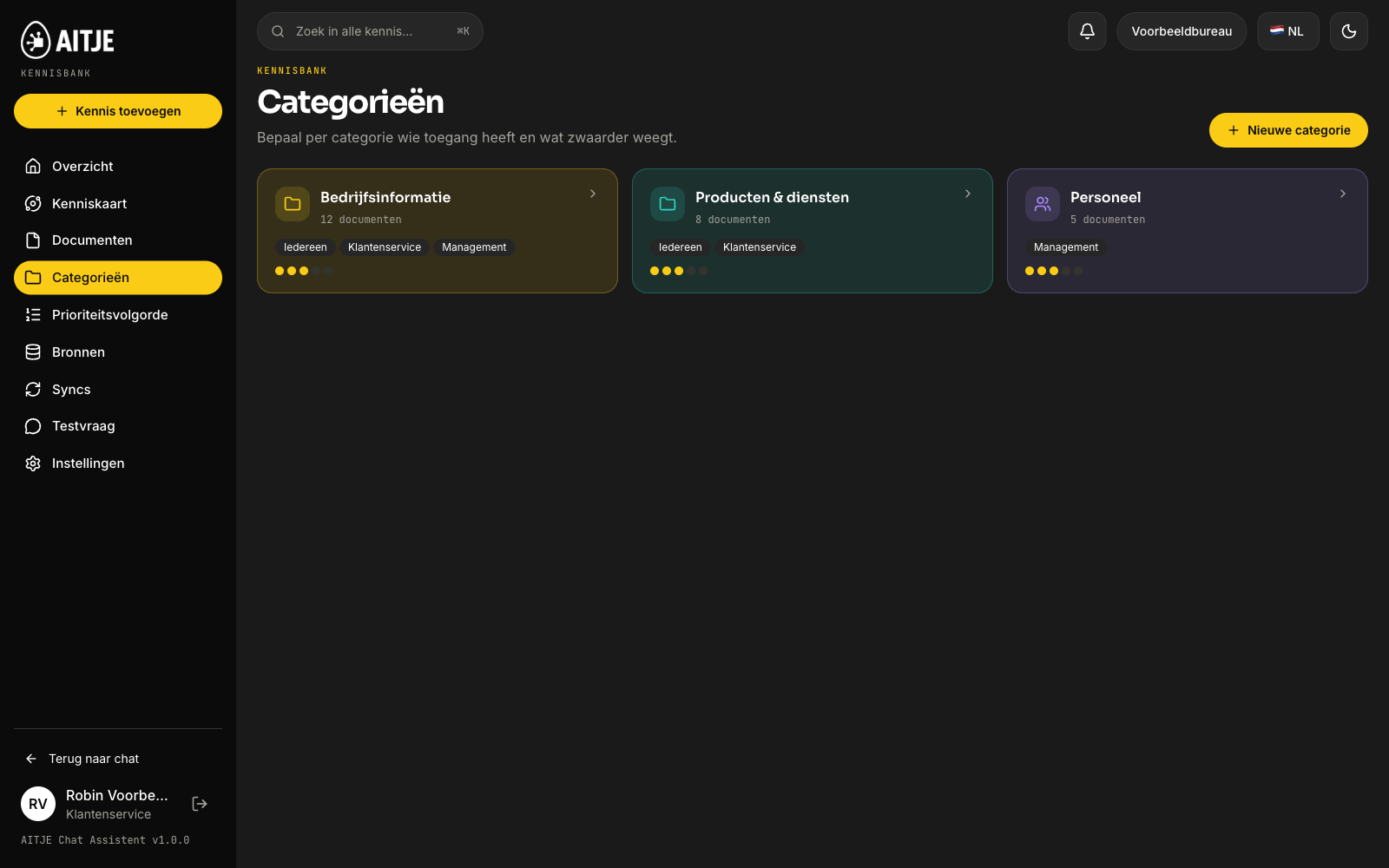
Categories, priority and timelinessOrganise sources, give greater weight to key information and keep an eye on changes, validity and synchronisation.
Access is provided by the sourceDetermine which roles are permitted to use the knowledge base. Read, upload and management permissions can be configured separately.
Organising knowledge and assigning rolesProduct listing
Real product interface. Pre-prepared example; no live generation or speed test.
01Add sources
Uploads and agreed integrations with storage, Drive, Microsoft or email.
02Locally searchable
Index by meaning, using the document structure and, where appropriate, an additional search assessment.
03Check answers
Source references help trace the origin. The original document remains authoritative.
In-house expertise, well-founded answers
The correct passage. For the right person.
RAG means that the Assistant first retrieves relevant information from your knowledge base and passes it on to the response model. The model derives context from your documents. You do not need to retrain the language model for this.
01
Read aloud
Documents, tables and scans are converted to text. Pages and sections remain recognisable; OCR helps with scans.
02
Indexing
Passages are given an embedding: a numerical representation for searching by meaning. Text and vectors are stored locally in PostgreSQL + pgvector.
03
Filter access
The search query takes into account the role, categories and document permissions. Confidential information is protected within the database query.
04
Search and sort
Searches based on meaning and Dutch keywords are combined. Priority, validity and a reranker help ensure that useful passages appear at the top.
05
Answers with sources
The selected passages are sent to the chosen model. The user receives source references and can view the origin within the current permissions.
How well does that RAG work?
You measure two things: find and answer.
A good answer starts with the right source. That is why, in knowledge management, you can ask a test question, select the role and see what is found or rejected. Save expected sources in an evaluation set and repeat the test after making changes.
We then assess the answer ourselves: does it match the source, does it quote the correct passage, and does it acknowledge where information is missing? Good search results alone do not guarantee a correctly formulated answer.
Will he find the right document?
Check whether the expected source is among the results and where it ranks. The evaluation shows the hit rate, recall and change compared to the previous test.
Will protected knowledge remain protected?
Test the same question with different roles. Opening a source from an old conversation also re-checks current access.
Does it take a guess if the answer is missing?
In ‘Business Knowledge Only’ mode, an empty search result immediately indicates that the information is not in the knowledge base. Other modes and model responses require their own verification.
Will the quality remain intact after a change?
Retest following the addition of new documents, changes in priorities or a change of embedding. Re-indexing runs alongside the active index and only switches over once the new index is complete.
A trial utilising your expertise will provide the relevant evidence.
We do not publish a general accuracy percentage for each knowledge base here. The software includes tests and an acceptance tool for sources, rights, and unknown questions and answers. The existing fictional demo does not demonstrate any measured quality on your documents. During the setup, we test using representative questions, real local models and the chosen hardware.
Readable documents, up-to-date information, the correct permissions and a suitable embedding, reranking and response model all contribute to the quality. A scan that is difficult to read or a missing appointment does not automatically become reliable knowledge.
Your environment, your choice of model
On your own hardware. Or on a suitable server.
Your laptop or phone is your gateway. The model and knowledge base run within the configured environment. AITJE assists with capacity, installation and accessibility via your own network, VPN or secure web access.
The local system operates without an internet connection once the models have been installed and the server and network are available. However, synchronising with external sources does require a connection.
Your browserLaptop · tablet · mobile phone
↓
Your AITJE environmentLocal model + in-house knowledge base
Model processing and the knowledge base remain within the organisation’s own environment. This local approach does not require any external AI calls.
AITJE Chat Assistant AI Station
Your own AI Station. Models, software and data all in one place.
A set-up AI working environment for chat, business knowledge and management. The local model, knowledge processing and permanent storage run on the agreed computer or server.
Your workplaceBrowser on a laptop or mobile phone
Secure connectionHTTPS · access per user
Your AI StationOn-site / on-premises / cloud
AITJE softwareChat, knowledge and management
Local modelComputations on your own hardware
PostgreSQL + pgvectorDatabase and vector index
Local filesDocuments and attachments
Where is the database located?
In the standard local installation, PostgreSQL runs on the AI Station. Accounts, roles, conversations and knowledge data are stored there. The vector storage is pgvector within that same PostgreSQL database: the searchable passages, their embeddings and the associated permissions are part of your own environment.
What is on the user’s device?
The browser opens the web app and displays the information to which the user has access. The central database, knowledge index and model processing are located on the configured Station. A mobile phone does not need to run a large language model itself.
What does the administrator control?
Who can log in, what knowledge and models are available per role, which tools are permitted, and where the usage and cost limits lie. Guardrails enforce agreed rules on knowledge, actions and responses. Access and logging follow the established policy.
What are the benefits of the AI Station?
A single shared environment for your team, with your own knowledge, access rights and local model processing. AITJE selects and tests the combination of hardware, model and configuration based on the questions you actually ask.
If an external AI service experiences a fault
The installed local model and the knowledge already loaded do not require that external model service. Chat and local search can remain available as long as the Station, the local services and your network are functioning. New synchronisation with Drive or Microsoft, web searches and external models require their own connection.
Technical storage in the standard installation
Vectors and passages
PostgreSQL with pgvector; active embeddings in chunk_vectors, passages in chunks.
Original knowledge bases
/var/lib/aitje/files/knowledge/, outside the webroot. Attachments and other files have their own storage.
Own server environment
The specific storage location, backups and access will be agreed with your IT department during installation.
AI Station describes the configured combination of environment, model and software. The software price, installation and required hardware or hosting are listed separately in the price breakdown and quotation.
Choose your computing power and your model provider
Local AI as a foundation. External inference as an option.
There are two options for where AITJE runs and where the language model performs its calculations. Whether it’s all on your own hardware, a model on your server or a linked inference endpoint: we’ll set up the combination that best suits your work.
01 / Own model environment
On your hardware or server
The model runs on your BOSGAME, Mac mini, local server or your own cloud capacity. Processing remains within that chosen environment; with on-premises inference, there is no external API token account.
Use frontier open models such as the available Kimi, DeepSeek, Qwen and GPT-OSS models via managed inference. AITJE assists with the model, endpoint integration, access and usage budgets.
External processing and pay-as-you-go rates. Public endpoints do not have a fixed country guarantee; we will agree on any required location on a case-by-case basis.
Allow staff to choose approved external models, in addition to the local AI. With Assistent, the administrator can require local anonymisation in advance, set model permissions and limit costs.
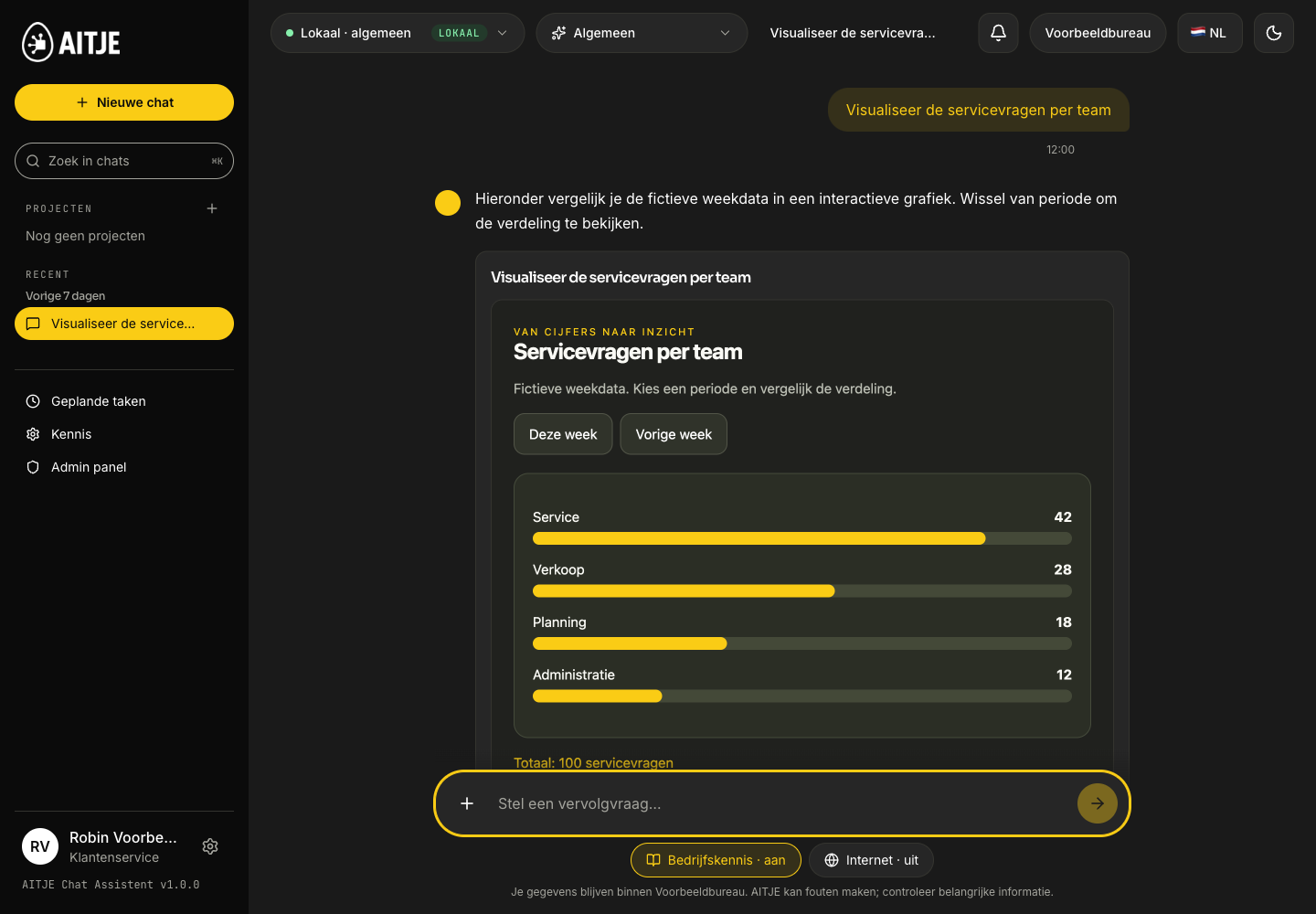
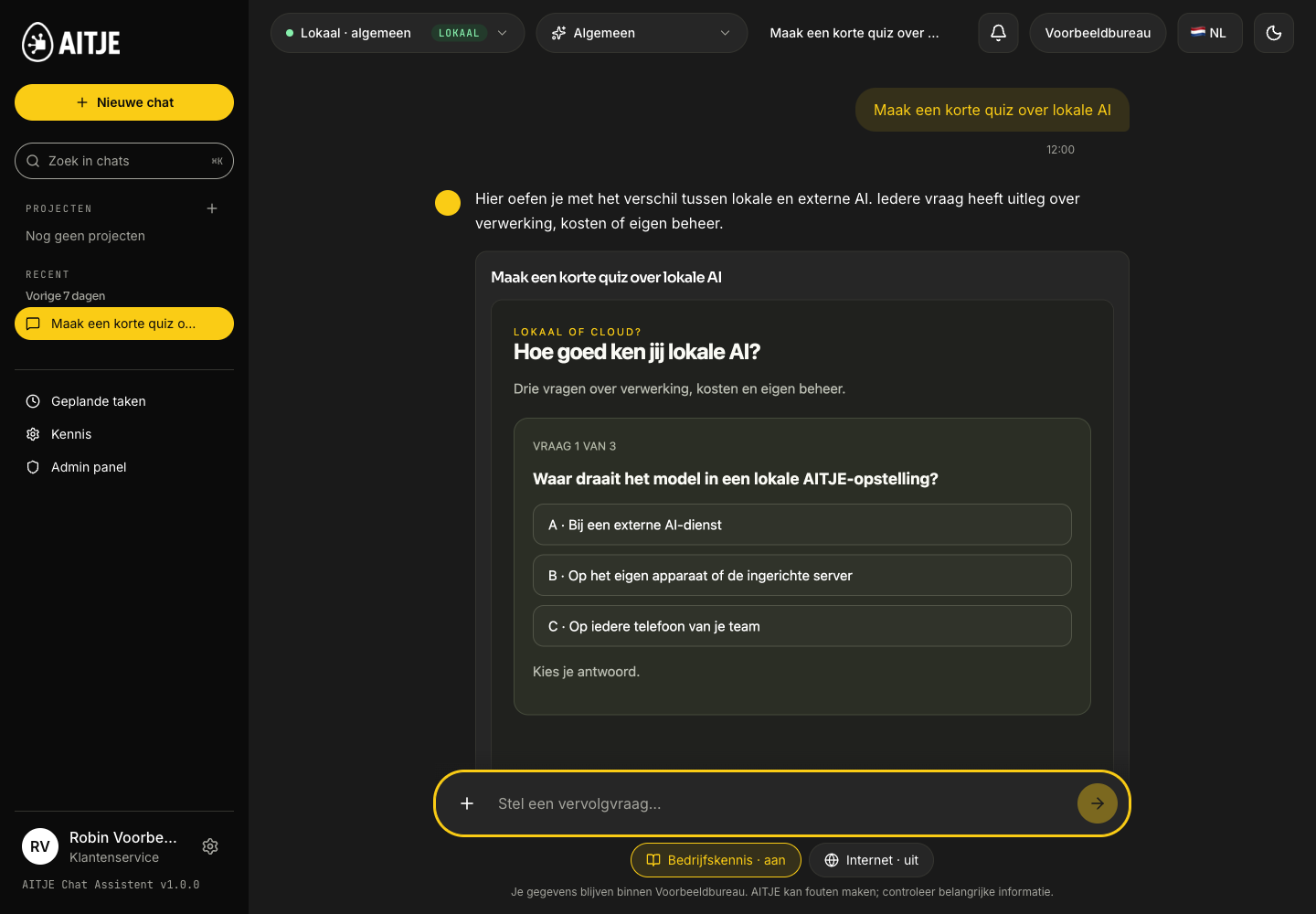
Request a quiz, dashboard, diagram, calculation or interactive explanation. The chat can supplement text with a rendered result that you can work with straight away.
You ask
“Create a short quiz to help me understand local AI.”
Quiz & learningProduct listing
Real product interface. Pre-prepared example; no live generation or speed test.
Quiz & learning
Knowledge sticks better when you practise it.
Have the assistant convert the explanation into questions with feedback. In this recording, you’ll practise the difference between local AI, external models and token costs. The same format can be used for training and onboarding.
Interactive rendering
HTML, interactive explanations and dashboards in a protected view. You can open, view and further customise the result.
Calculations and analysis
Python can perform calculations, process data, create graphs and generate files within the available sandbox.
From response to file
Continue working with PDF, DOCX, CSV, text, code or a diagram. The exports available depend on the type of result.
The screenshots show pre-prepared examples within the actual product interface. In the Assistant, the selected model generates the output; quality and available features depend on the model, the task and permissions. Constructing a comprehensive response may require additional model iterations.
Token usage, costs and quality
Strong output. Local costs.
With local AI, you purchase the computing environment. You do not pay an external API fee for every token read or written. This makes frequent use attractive, whilst allowing you to choose the model, the hardware and the management.
External token costs · local model€0per million input and output tokens
The model processes queries on your own device or server. Software, hardware, power and management incur their own costs.
BOSGAME · a practical example from AITJE< €0.40electricity per day
Based on intensive local use on hardware tested by AITJE. AITJE used, amongst other things, an M5 with gpt-oss-120b and an M6 with Qwen3.8.
Reported practical experience. Your electricity tariff, model, power rating and usage pattern determine your bill. This is not a total daily price including purchase or software.
Read the input. Write the output.
How much does the same cost? token volume via an API?
An example with 10 million input tokens and 2 million output tokens. With an API, you pay for both. With local model processing, the external token charge is zero.
10Minputtokens
2Moutputtokens
Input also includes any accompanying context and conversation history. Reasoning tokens and additional model runs may increase usage.
Standard API rates in USD · verified 18 October 2026
Processing
Input / 1M
Output / 1M
This volume
AITJE · local modelExternal API costs
US$0
US$0
US$0
Claude Sonnet 5.5
US$2
US$10
US$40
Claude Opus 5.5
US$4
US$20
US$80
Claude Opus 4.6
US$5
US$25
US$100
Comparison of the same token volume, excluding caching, batch discounts, tools or taxes. Model choice, output quality and speed vary. The local row does not include hardware, software, power or management costs.
In the published comparison, Qwen3.8-27B scores higher in following instructions and document comprehension. Opus 4.6 scores higher in the two reasoning and terminal tasks listed below. The task determines which model is suitable.
Qwen3.8-27BClaude Opus 4.6 Max
Follow the instructions
IFBench
Qwen
79.5
Claude
62.5
Understanding documents
OmniDocBench 1.5
Qwen
91.1
Claude
86.6
Scientific reasoning
GPQA Diamond
Qwen
89.2
Claude
91.3
Tasks in the terminal · Terminus
Terminal Bench 2.1
Qwen
73.0
Claude
78.2
Scores from Qwen’s own model map, on a scale of 0–100. These are not measurements of the AITJE installation or the BOSGAME shown. Quantisation, context, tools and hardware influence real-world performance. The comparison uses Opus 4.6 Max; the price table also mentions newer versions of Claude.
On the BOSGAME M5, AITJE reports approximately 8–12 output tokens per second using a 4-bit 100B/120B model. On the M6, Qwen3.8 was used extensively during the development of a mobile app. We select and test the configuration based on your specific type of work.
Practical indication from AITJE; no general speed guarantee applies to all models, context lengths or user numbers.
OpenAI / Claude · local privacy layer
An external model. Anonymise locally first.
Use OpenAI or Claude within the same Assistant, if your administrator permits it. Before the model is called, AITJE replaces any recognised personal data locally with codes; the response will have the original values restored in your environment.
Make anonymisation mandatory by role
Limiting model access and costs per user
View what was sent to the provider for each response
Concept illustration · local masking prior to external inference
01 / In your environmentMail Noor de Vries op noor@voorbeeld.nl
02 / To the selected external modelMail [PERSOON_1] op [EMAIL_1]
Fictitious text example. The translation table remains in your AITJE environment.
What exactly does this privacy layer protect?
This is reversible pseudonymisation of recognised text; it does not guarantee that all information is anonymous. Unrecognised content and trade secrets may remain; name recognition requires the local recognition model. With anonymisation enabled, images are skipped. Web searches and MCP links have their own permissions and are not automatically covered by this model switch.
Give your team some breathing space. Stay in control.
Decide who is allowed to use which knowledge, models and tools. Set euro and token limits, safeguard data with guardrails and keep track of your own AI environment.
Concept illustration featuring a real product photograph · fictitious data
Guardrails · enforced in the software
Your guidelines. Even if the AI suggests otherwise.
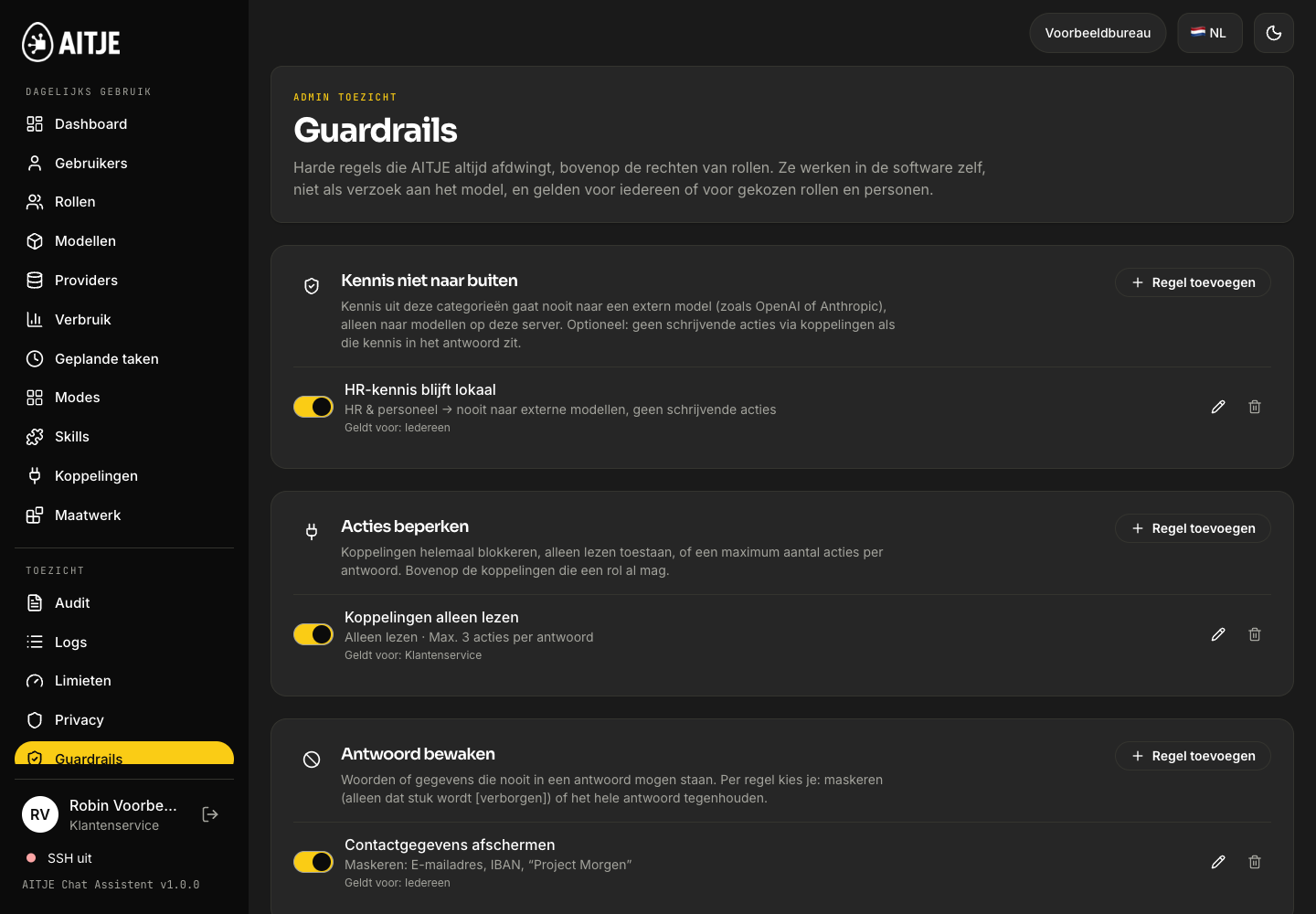
An administrator determines more than just access and budget. With guardrails, you set strict limits on knowledge, actions and responses. For everyone, a role or specific individuals.
Keeping knowledge local
HR expertise remains within the organisation’s own environment.
Select categories that may only be used by local models. You can also prevent writing actions via links when that knowledge is contained in the answer.
HR & staffRule: local only
In-house modelPermitted
External modelBlocked
A local knowledge rule also applies if a role is permitted to use external models.
Website example with fictitious data. Recognition follows the set rules; check your setup using representative examples.
Setting guardrails and testing a responseProduct listing
Real product interface. Pre-prepared example; no live generation or speed test.
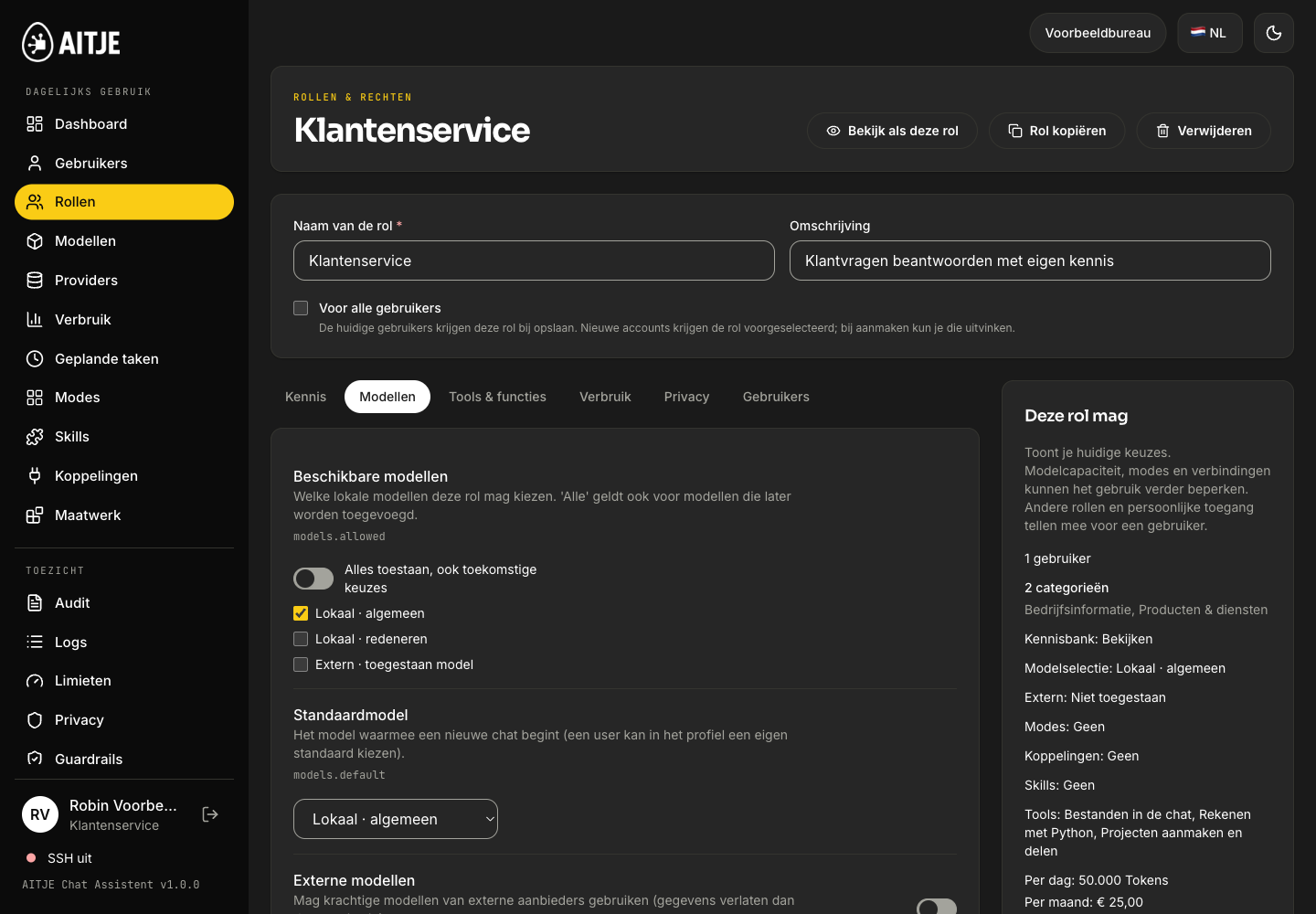
Role caps determine the standard limits per user in this role. Set both euros and tokens per calendar period.
This is what Robin sees
Local · generalExternal · permitted model
Example usage · Month€18.50 / €25.00
Tokens in and out640,000 / 1,000,000
The external model can be used within the permitted models and all active budget limits.
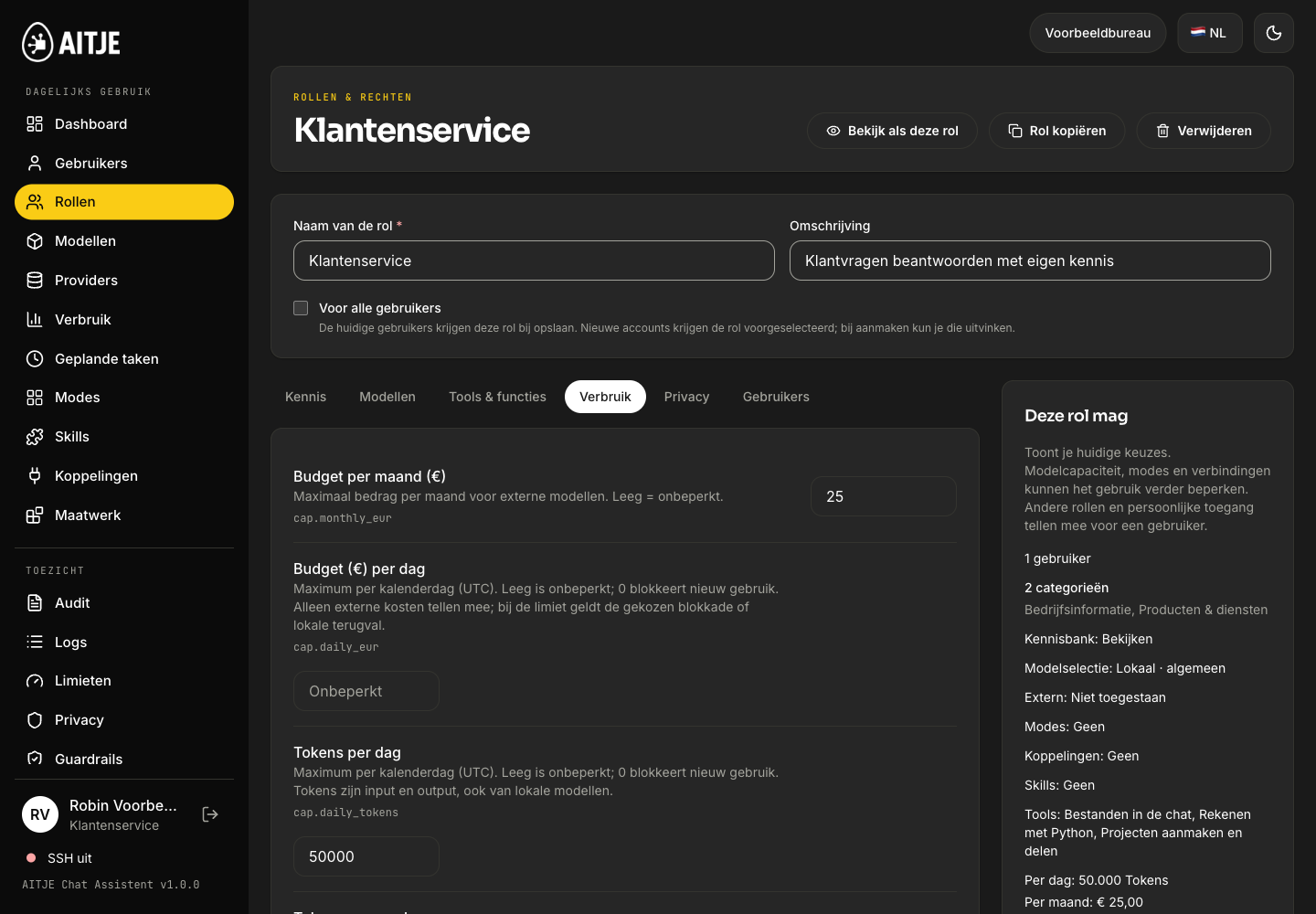
Price & token capsProduct listing
Real product interface. Pre-prepared example; no live generation or speed test.
A euro limit and a token limit each serve a different purpose.
Eurocaps limit external AI costs. Token caps limit processing, even with local models. Daily, weekly, monthly and annual limits may apply simultaneously. A response that is still in progress may exceed a limit; the limit controls the authorisation of new generations. A personal token limit that has been reached cannot be circumvented by continuing locally.
01 / KNOWLEDGE
Who is authorised to view what?
Categories, read and upload permissions, roles and shared project knowledge. HR information does not need to be available to the entire organisation.
02 / MODELS
Which models are eligible?
Permitted models, default selection, local or external, and rules for anonymisation. Web search, uploads, sandbox, speech and tools are configured separately.
03 / USAGE
How far can it go?
Euros and tokens per day, week, month and year. An empty limit may mean unlimited; zero does not allow any new usage within that limit.
04 / CAPACITY
What can the environment handle?
Users, concurrent sessions, upload size and chat history. Exceptions per role or individual help ensure the hardware is used appropriately.
A specific setup
A role cap is the starting point. The borders work together.
Twelve employees, each with a role-based allowance of €25 per month, do not share a pot of €25. An additional provider budget can limit the combined external usage for that service.
Where do you draw the line?
Fictitious example
What does that enable you to do?
By role
€25 per month + 50,000 tokens per day
Standard limits per user in that role.
Per person
Robin: €15 per month
A personal policy that replaces his role descriptions.
By provider
€100 per month for the external service
An additional shared boundary with that provider.
Per API key
2 million tokens per month + 60 requests per minute
A separate boundary for an app or integration, in addition to scopes and access.
How do multiple roles and personal caps work together?
Permissions from multiple roles are combined. For a budget limit, the highest role value per period and unit applies; an unlimited role value can therefore increase the limit. A configured personal budget policy overrides the role caps for that user. Provider and API limits also remain applicable. The server checks the permissions and limits.
What about privacy, access and technical management?
Set retention periods, external alerts and access policies carefully. An administrator does not automatically have access to every private conversation. Chat access follows the configured permissions and notifications. Technical logging is configurable, is intended for diagnostic purposes and should not contain any chat content or confidential information. AITJE assists with backups, system status and maintenance arrangements.
All settings, amounts and usage figures above are for demonstration purposes only. The buttons only affect this website example.
The complete admin navigation
Your own AI environment. Behind the scenes too.
From inviting users to setting up a suitable workspace for your team.
Dashboard
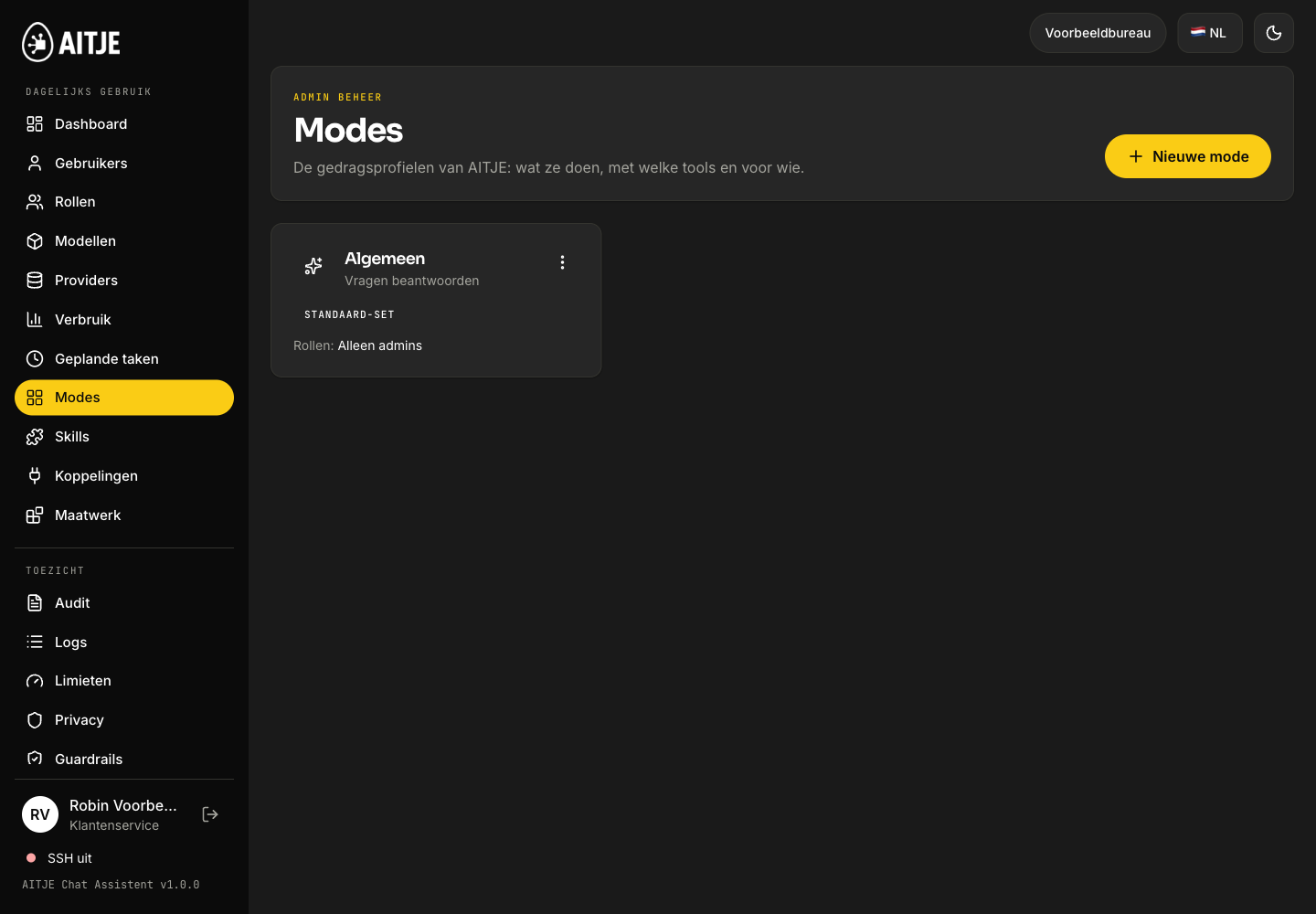
Health, usage and points to note regarding the installation.
Users
Accounts, roles, blocking and restoring access.
Roles
Knowledge, models, tools and usage limits for each target group.
Models & providers
Manage local models and consciously authorise external services.
Usage
Break down questions, tokens and costs, and set caps.
Scheduled tasks
Track status, tax and costs; pause or stop tasks.
Modes & skills
Work stages and reusable instructions for your approach.
Links & bespoke solutions
Permitted resources and organisation-specific extensions.
Everyday useProduct listing
Real product interface. Pre-prepared example; no live generation or speed test.
Preparations that are already underway
Your morning round-up can already be ready.
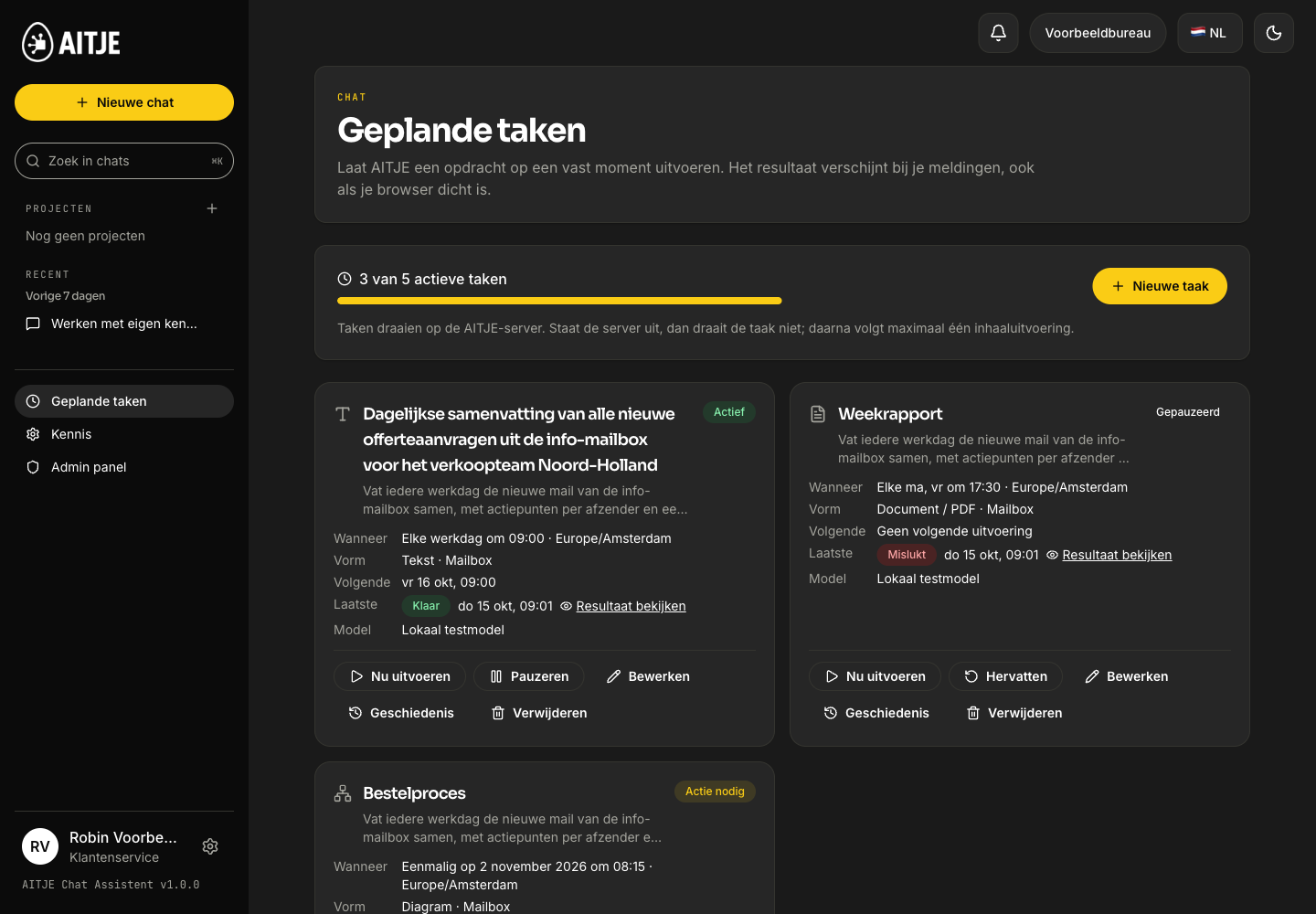
Schedule recurring tasks using authorised sources. The result appears as a notification, with text or a downloadable document. Even when your browser is closed.
Email account integration and other external sources are arranged separately. They require a connection and the appropriate access rights.
Example · the service overview
You schedule the assignment
Every working day at 09:00: compile a list of the approved service enquiries. You choose the sources and the assignment.
Illustrative scenario. *The time of the report is an example, not a measured turnaround time.
From document to day-to-day work
Chat. Knowledge. Management. A single, integrated environment.
A resource in the knowledge base becomes available in the chat. A role determines who is authorised to work with it. A scheduled task uses the same agreed permissions.
Documents in your knowledge baseProduct listing
Real product interface. Pre-prepared example; no live generation or speed test.
Planned tasks and deliverablesProduct listing
Real product interface. Pre-prepared example; no live generation or speed test.
An assistant tailored to your organisation
Your approach. Your own AI environment.
A personalised assistant derives its value from its configuration. You combine business knowledge, instructions and tools with the parameters you require.
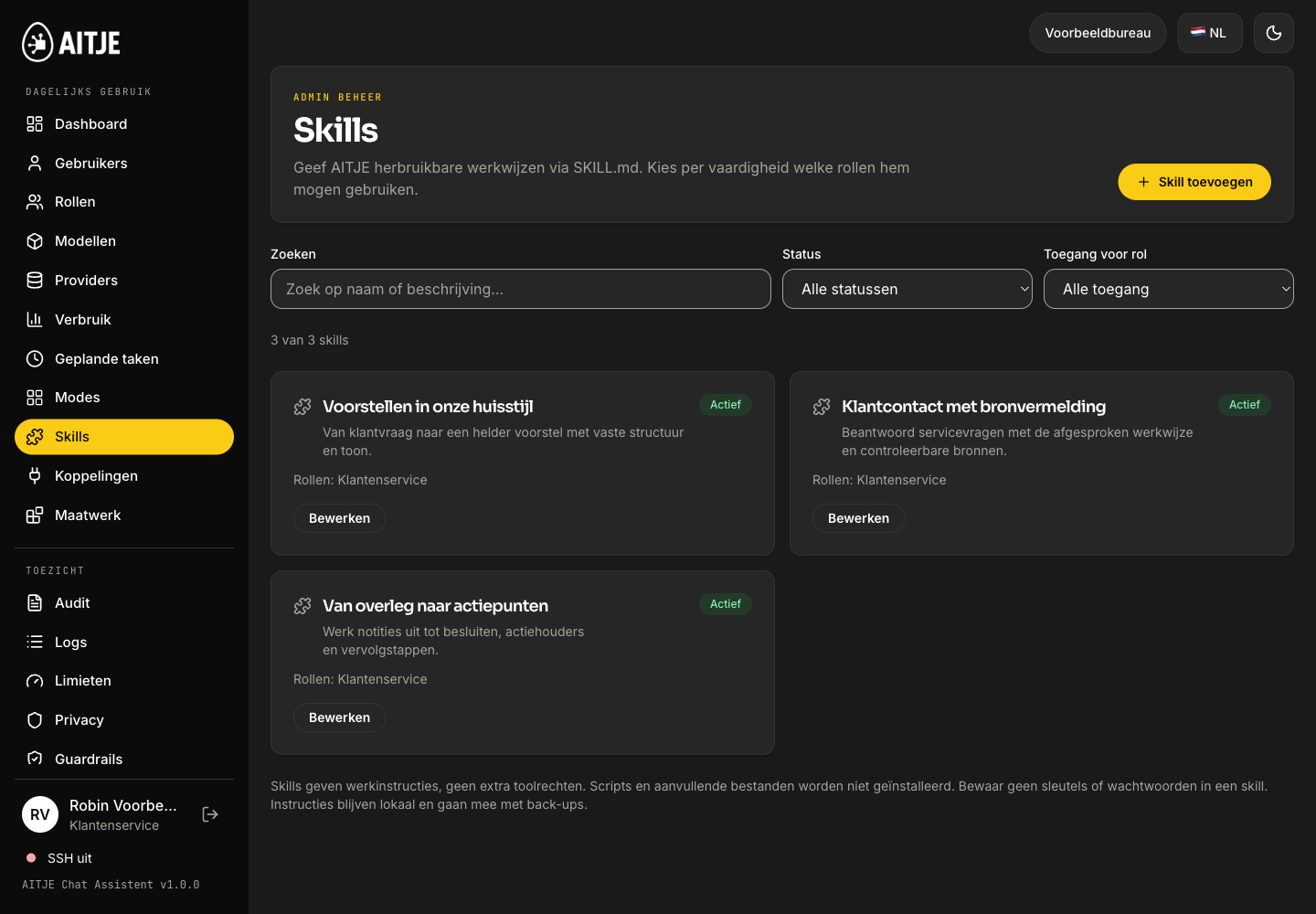
Our approachProduct listing
Real product interface. Pre-prepared example; no live generation or speed test.
This is how we work. This is how the assistant helps.
Establish a standard approach for recurring tasks. Skills store instructions for, for example, a proposal, a client response or a meeting report. You determine which roles are permitted to use them.
From setup to day-to-day operations
Our approach
↓
AITJE Assistent
Fixed structureYour toneReusable instructions
↓
A proposal in line with your approach
Your existing systems can be integrated.
Uploads and links can access local storage, Drive, Microsoft, email or a custom process. We tailor access, synchronisation and any bespoke development to each source. Skills provide instructions; links provide authorised functions.
On your own device, in your server room or on an agreed server environment. The local model and knowledge processing run there. Your laptop and phone are the entry points.
Own computing environmentIn-house knowledge baseIn-house access policy
With local models installed and knowledge loaded, the local infrastructure remains usable without an internet connection, provided the server and network are available. External models, web search and cloud synchronisation require a connection.
In-house
Your AITJEModel + expertise + processing
Workplace
On the move
Your team
Roles · models · caps · guardrails
From your first enquiry to your own AI workspace
AITJE brings it all together. You’ll be working with it.
We select and test the configuration for your applications. We assess response quality, resource usage and latency using representative workloads and appropriate concurrent usage.
Start with work that matters.
We map out the users, work requirements and data flows. You can see what knowledge is required and which components work locally or online.
Don’t need your own hardware? AITJE offers multiple servers in data centres running language models and coding agents. Use a pre-configured environment or perform inference via an endpoint, specifically tailored to your workflow.
Tailor your workflow to up to 100× lower API costs.
Cost-saving target for suitable workflows, compared with the use of frontier APIs from OpenAI, Anthropic and Gemini. We assess the model quality, volume and costs against your specific tasks; the rationale and rates will be included in your proposal.
Language modelsCoding agentsInference API
Hosting, computing power and inference are quoted separately. The achievable savings vary per workflow and do not constitute a general price guarantee.
Investing in your own AI
A complete environment. A price you can keep track of.
You purchase AITJE Assistent per environment. The software price does not increase per employee; we tailor the required capacity to your usage.
Local AI · in-house
ChatKnowledgeManagement
One product for your environment.
Continued use of the delivered version. Users and concurrent usage are subject to the configured hardware and limits.
AITJE takes care of itWith basic installation
€599
Product + basic installation · excl. VAT
Hardware or hosting is charged separately · subject to quotation
AITJE Assistent software
€499
Installation and setup
from €199
Introductory offer
−€99
Product + basic installation
€599
Standard from €698. Introductory offer for Assistant and Coder for the first 100 paying customers. Availability will be confirmed in your quotation.
Installation on a pre-configured, suitable environment, testing functionality and providing guidance. We agree on brief follow-up support. The basic installation is estimated to take two to two and a half hours.
You can choose your hardware and hosting separately
Where would you like to run your AI?
The product price shown above is for software and basic installation. New hardware, server hire and paid inference are charged separately. If you have existing suitable hardware, there may be no need to purchase a new device.
BOSGAME M5 / M6 · Mac mini · own hardware · own server · Hetzner · DigitalOcean · AITJE data centre
Work with us to find a suitable solution
Whether it’s your own hardware, an external server, the cloud or a combination: tell us what you want to become more independent from. AITJE will find a suitable technical and financial setup.
Product + basic installation
€599
Hardware / hosting / inference
+ on quotation
Total solution
Personalised quote
Solution and total investment to be quoted. All amounts are exclusive of VAT; external providers and ongoing use are agreed separately.
Hardware, server hire and energyCleaning up and comprehensively organising knowledgeLinks and bespoke solutionsUpdates, maintenance and supportExternal API and usage costsTravel, location and network costs
All amounts are exclusive of VAT. These components are quoted separately in advance. A demo or assessment helps to determine the required environment and setup.
Case studies
Assistant in practice.
From searching through internal knowledge to connecting work processes. Discover the application, the need and the approach.
Chat with the installed model, ask questions about the local knowledge base, local documents and images, and manage settings. This requires your device or server and the local network to be available.
With internet
Web searches, updates and new models, remote support where agreed, and external models if you specifically choose them.
Capacity
Speed, model size, number of concurrent users and knowledge base capacity depend on the hardware or server. AITJE recommends a light or powerful environment based on your usage.
System requirements
Minimum and recommended specifications will be confirmed prior to publication. Not sure whether your hardware is suitable? Ask AITJE.
Frequently Asked Questions
Questions about Assistant.
What is ‘AITJE Assistent’?
Your own AI chat assistant, similar to ChatGPT, but on your own device or server. You can write, summarise and ask questions, including about your own documents via the knowledge base.
Does ‘AITJE Assistent’ work without an internet connection?
The local components do: chat, the knowledge base and management work as long as your device or server and the local network are available. Web search and updates require an internet connection.
How much does AITJE Assistent cost?
The standalone product costs €499 per environment, with no per-user licence fee. Including basic installation, testing, training and agreed short-term aftercare, an introductory price of €599 applies; the standard price starts at €698. Introductory offer for Assistent and Coder for the first 100 paying customers. Availability will be confirmed in your quotation. Hardware, server hire and additional setup are quoted separately. All amounts are exclusive of VAT.
How many people can use it at the same time?
There is no per-user licence. The practical number depends on the hardware or server and on how many people are working at the same time. AITJE advises on capacity based on your usage.
Can you set up the knowledge base for me AITJE?
That’s possible. The knowledge base software is included with the product, and you can add sources yourself. AITJE can clean up and structure documents and set up focus modes as a separate assignment or as part of an SLA.
Is AITJE Assistenta separate version?
No. It is a single product. How powerful your environment is depends on the hardware or server you choose.
Which file formats can I add to the knowledge base?
The knowledge base supports common file formats, such as PDF, CSV, Excel, TXT and Word (.docx). Do you have a different format? If so, we’ll work with you to determine the best way to import that information.
Can AITJE Assistent also read scanned documents and images?
Yes. AITJE Assistent can also process information from scanned documents and images. How well this works depends, amongst other things, on the legibility and quality of the file.
Can AITJE Assistent show which document an answer comes from?
Yes. For answers based on the knowledge base, the Assistant displays source references. This allows you to identify which documents were used and to compare the answer with the original information.
What happens if documents in the knowledge base contradict one another?
The model indicates when the information found contradicts itself. In the knowledge manager, you can also assign a priority or weighting to categories or specific documents. This allows you to specify which sources should be given greater weight, for example, a current work instruction over an older document.
How are amended or deleted documents processed in the knowledge base?
Changes are processed during database synchronisation. The information is broken down into searchable text segments, also known as chunks, and converted into vectors for the search index. During a chat, the Assistant retrieves the relevant information from this using RAG. The synchronisation ensures that changes and deletions are taken into account; prior to this processing, the previous version may still be present in the index.
Can each department have its own secure knowledge base?
Yes. You can assign specific knowledge to particular user roles. This allows you to determine which employees have access to which information, for example by department or role.
Where are the database and vectors from the knowledge base stored?
The Assistent uses PostgreSQL with pgvector in the configured AITJE environment. This is where the searchable passages and vectors are stored; original knowledge bases are stored separately on the same environment. We will agree in advance whether this is at your premises, on your own server or in the cloud.
Can I use OpenAI or Claude with local anonymisation?
Yes, provided your administrator permits external models. AITJE can replace recognised personal data locally with codes before the model is called and restore values locally in the response. This is reversible pseudonymisation, not a guarantee of complete anonymity; unrecognised content may still be included. Roles can make anonymisation mandatory, restrict models and limit usage costs.
What hardware and hosting options are available?
BOSGAME M5 or M6, a suitable Mac mini, existing hardware, your own server, Hetzner, DigitalOcean or an AITJE server in the data centre. The application and model can run together or separately. The product price does not include new hardware, server rental or paid inference; these costs are itemised separately in the quotation.
Can AITJE handle model processing via Nebius or its own servers?
Yes. Nebius Token Factory offers powerful open models via paid external inference; the managed integration supports model rights, budgets and the configured anonymisation policy. AITJE also offers language models and inference on its own data centre servers, configured for your workflow. Capacity, processing location and rates are agreed in advance.
Can I request an on-site demo or a demo endpoint?
Yes. Choose an on-site demo with hardware or request a demo endpoint for remote testing. Your choice and the product will be pre-filled in the contact form and sent along with the request. We will contact you to arrange a visit or access.
Wider possibilities
Need something similar, but slightly different?
AITJE Assistent See what AITJE can build. Need different workflows, integrations or hardware? That’s possible with AITJE Custom — bespoke AI.